This audit was generated on April 8, 2026
The data may no longer be up to date.
 US
USVisibility Breakdown
How your app performs across different visibility factors
Want to track this data in real-time?
Sign up for free and get daily updates on your app's visibility and rankings.
Start tracking for freeKeyword Rankings
Your app's position for key search terms
10
Keywords analyzed
10
Ranked in top 100
8
In top 10
| Keyword | Rank | Traffic | Difficulty | Ahead | Behind | Top 5 |
|---|---|---|---|---|---|---|
| watchglucose | #1 | — |  |     | ||
| galaxy watch glucose | #1 | — |  |    | ||
| glucose watch | #2 | |  | | ||
| wear os glucose | #2 |  | | | ||
| sugar watch complication | #3 | | |   | ||
| libre watch complication | #5 |  | |    | ||
| glucose complication wear os | #6 | |  |  | ||
| glucose monitoring watch | #7 | |  | | ||
| glucose tracker wear | #17 |  |  |  | ||
| diabetes watch face | #31 |  |  | 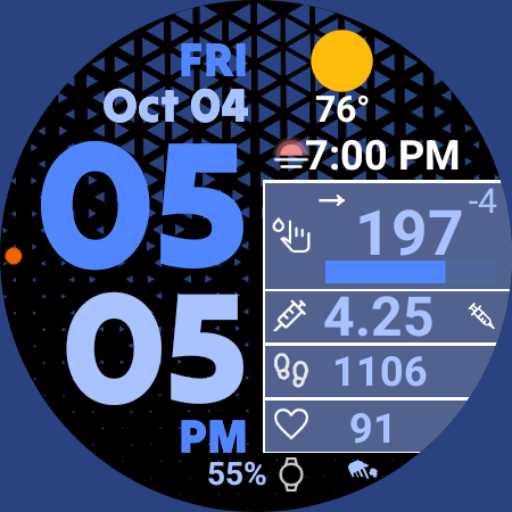  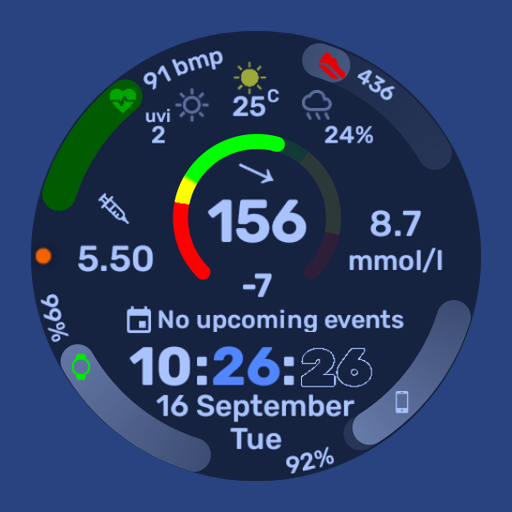 |
Keyword Competitors
Apps positioned directly before or after yours on keywords
GlucoDataHandler
Tools
Wear OS by Google Smartwatch
Communication
Gluroo: Diabetes Log Tracker
Health & Fitness
DMM14 Diabetic Watch Face
Personalization
Weather Complications: Wear OS
Weather
WatchGlucose Digital Face
Health & Fitness
Glucose tracker-Diabetic sugar
Health & Fitness
Glucose Tracker - Blood Sugar
Health & Fitness
DMM13 Diabetic Watch Face
Personalization
Complications Suite
Tools
Occurrence count shows how many keywords each competitor appears on
Category Ranking
Medical chart position
MyChart
CVS Health

UnitedHealthcare

GoodRx: Prescription Coupons
Teladoc Health
myAir™ by Resmed

Sydney Health

APPatient
Libre by Abbott

Aetna Health
SimplePractice Client Portal

FollowMyHealth®

athenaPatient
MyQuest for Patients

LifeMD
Improve your ratings and downloads to climb the category charts.
AI-Powered Analysis
Personalized insights generated by our AI
WatchGlucose has an excellent keyword presence (100% keyword score) but suffers from low visibility in charts, a modest quality score, and a 3‑star rating. Immediate focus should be on boosting ratings, expanding chart presence, and refining metadata to capture untapped high‑traffic keywords.
All 10 target keywords rank within the top 10, with flagship terms like "watchglucose" (rank 1, traffic 48) and "galaxy watch glucose" (rank 1, traffic 39) leading. Maintain these positions while protecting them from competitor encroachment.
Charts Score is 0% – the app does not appear in any Global or Category charts, limiting organic discovery. This is critical given the competitive gap with apps like GlucoDataHandler that rank on charts.
Current rating is 3.0★ from only 76 reviews, pulling the Quality Score down to 63%. The low sentiment directly impacts install conversion and chart algorithms.
The app is not ranked in the Medical category, despite relevance. Missing category visibility reduces exposure to users browsing by specialty.
Keywords such as "diabetes watch face" (rank 31, difficulty 46) and "glucose tracker wear" (rank 17, difficulty 35) have decent traffic but low competition. Optimizing the description and subtitle for these can push them into the top 10.
High‑quality screenshots, a short demo video, and a refreshed feature graphic can lift the Quality Score and click‑through rate, helping the app break into charts. Competitors with strong visuals rank higher.
- 1Add high‑traffic keywords (e.g., "diabetes watch face", "glucose tracker wear") to the title/subtitle and description, keeping the title under 30 characters.
- 2Launch an in‑app rating prompt after successful glucose reads and incentivize 5‑star reviews to raise the rating above 4.0.
- 3Create localized screenshot sets and a 15‑second video showcasing the complication feature on popular watch faces.
- 4Submit an updated app bundle with enhanced performance and bug fixes to improve user satisfaction and enable chart eligibility.
- 5Run A/B tests on the feature graphic and app icon to increase click‑through rate, aiming for a ≥15% lift.
ASO Insights
Actionable recommendations to improve your visibility
Strong visual presence
13 screenshots give users a comprehensive view of your app.
Recently updated
Your app was updated recently, signaling active maintenance to users and stores.
Strong keyword positions
Ranking in top 10 for 6 keyword(s): glucose watch, glucose monitoring watch, wear os glucose.
Good visibility score
Score of 78/100 indicates solid app store presence.
Rating needs improvement
A 3.0 rating may deter potential users. Focus on fixing bugs and improving UX.
Not in category top charts
Improving ratings and downloads can help reach category top charts.
Track WatchGlucose in real-time
This audit gives you a snapshot. With Applyra, you get continuous monitoring, competitor alerts, and AI-powered recommendations to grow your app.
No credit card required · Cancel anytime
Audit FAQ
Common questions about this ASO audit.
What is the ASO visibility score of WatchGlucose?
WatchGlucose has a visibility score of 78 out of 100 on the Google Play (US). The score combines keyword rankings, top charts presence, and listing quality signals like rating and update recency. This audit was generated on April 8, 2026.
On how many keywords does WatchGlucose rank?
WatchGlucose is tracked on 10 keywords in this audit. It currently ranks in the top 100 for 10 keywords, with 8 keywords reaching the top 10. Ranking in the top 10 is where most discovery traffic happens.
Who are the main competitors of WatchGlucose?
Based on shared keyword rankings, the most frequent competitors of WatchGlucose are GlucoDataHandler, WatchGlucose Digital Face, Wear OS by Google Smartwatch. These apps appear next to WatchGlucose on the keywords it ranks for, which makes them the most direct opportunities for ASO benchmarking.
What category is WatchGlucose in on the Google Play?
WatchGlucose is listed in the Medical category on the Google Play.
How can WatchGlucose improve its App Store Optimization?
Based on this audit, WatchGlucose should focus on the keywords where it ranks 11 to 50 (closest to the top 10), benchmark its title and subtitle against the most frequent competitors, and refresh its listing regularly to maintain quality signals. The full audit lists specific weaknesses, opportunities, and AI-generated suggestions tailored to WatchGlucose.
How was this ASO audit generated?
This audit was generated automatically by Applyra by scraping public Google Play data: app metadata, keyword rankings, category positions, and competitor listings. Visibility, keyword and listing quality scores are computed from those signals. Audits are free and do not require an Applyra account.