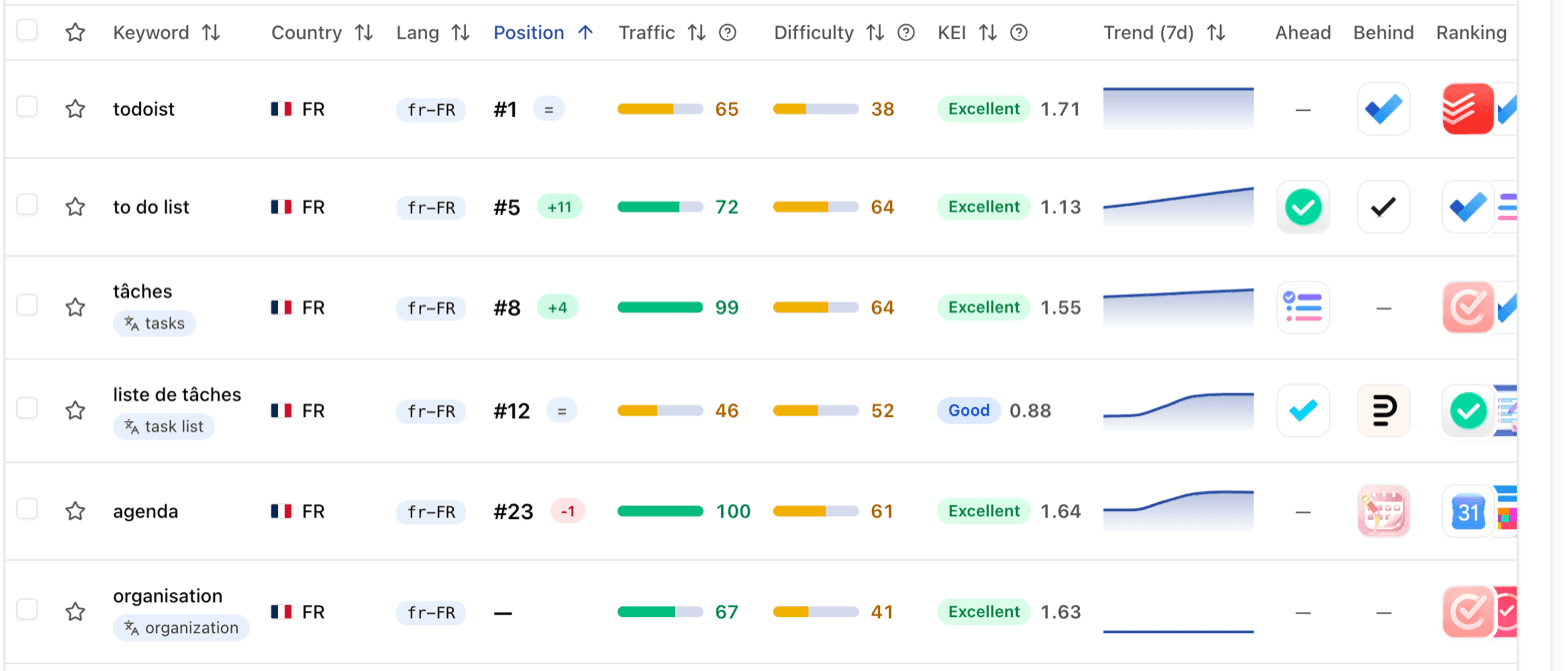
Working on your German listing when you do not read German used to mean a second tab and a translator, or translating the whole page in the browser, keywords included.
Applyra now translates store text in place. Turn on Translate to in the top bar and every keyword, app name and subtitle written in another language gets its translation in a pill underneath, with the original left where it was:
- Keywords, in the Keywords Tracker, the Keywords Inspector, the ASO Health tab, competitor comparisons and the tools (Niche Analysis, the Autocomplete and Metadata simulators).
- App names and subtitles, on the app page and in competitor comparisons.
- Descriptions and release notes, on the Store listing tab, with an Original switch to read the text the store serves.
Translations follow search intent rather than the dictionary, keep brand names as they are, and flag a keyword that can mean two things. The original stays the reference, because it is what the store ranks.
It works the other way too. Where you type keywords or draft a listing (Track keyword rankings, the Keywords Inspector, Niche Analysis, the Autocomplete and Metadata simulators), Translate to writes your words for that market: shared calendar becomes agenda partagé on the French App Store. And the Keywords Tracker's search finds a keyword by its translation.
Pick your language once in Account. Applyra starts from your browser's. Store translations are on every plan, free included.