A competitor passes you on a keyword you have held for months. You open their store page. It looks the same as last time you looked, which was a while ago and mostly from memory.
Did they rewrite the subtitle? Swap the first screenshot? Change nothing and just get lucky?
You cannot answer that, because an App Store listing change leaves no trail behind it. The stores serve today's listing and act as though nothing preceded it. No changelog, no diff view, no edited-on stamp on the fields that matter.
The short answer
Track the nine fields the stores actually expose, every day, per country, and compare content rather than URLs. Applyra does this automatically for every competitor you add, on both stores, and tells you the day something moves. The free plan covers one competitor with no card.
What it looks like when it works
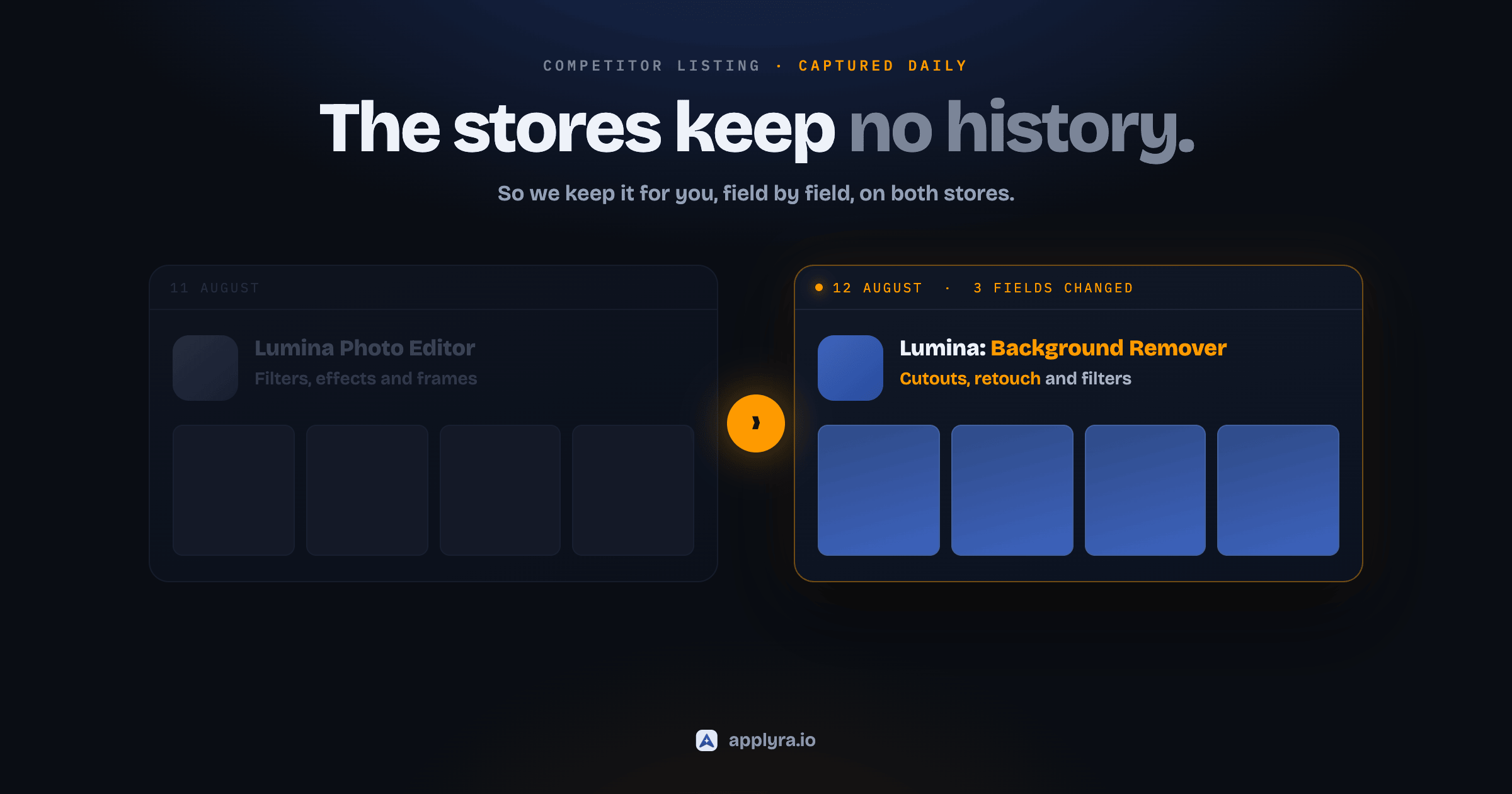
Here is the thing the stores refuse to give you: a competitor's listing history, newest first, with each change opened up field by field.
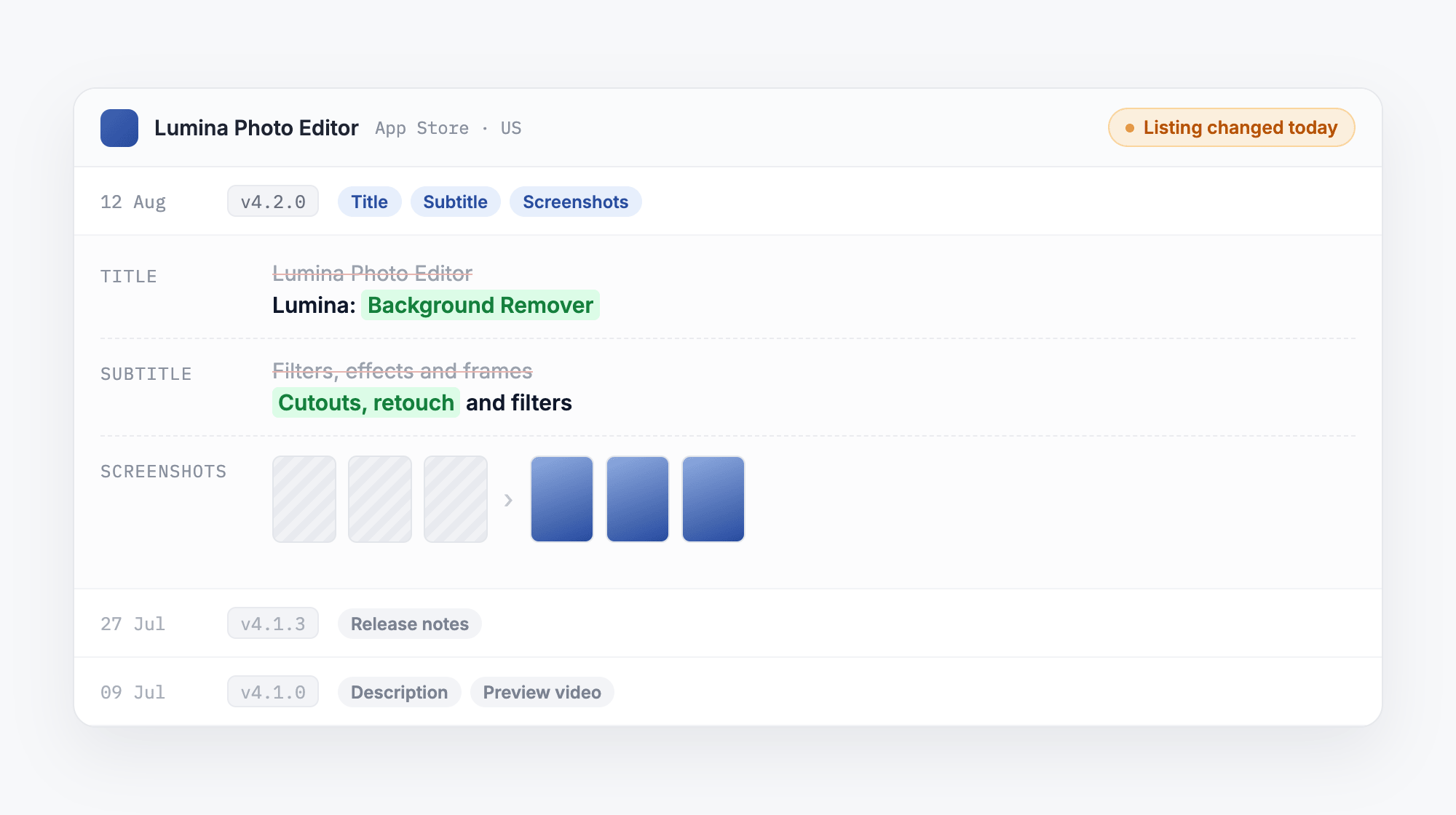
Three things in that view are doing real work.
The change is dated. You know the listing moved on 12 August, not "sometime this summer". That date is what makes everything downstream attributable.
The diff is field by field. You are not told "the page changed". You are told the title became Lumina: Background Remover, the subtitle swapped Filters, effects and frames for Cutouts, retouch and filters, and three screenshots were replaced. Those are three different strategic signals and they deserve three different reactions.
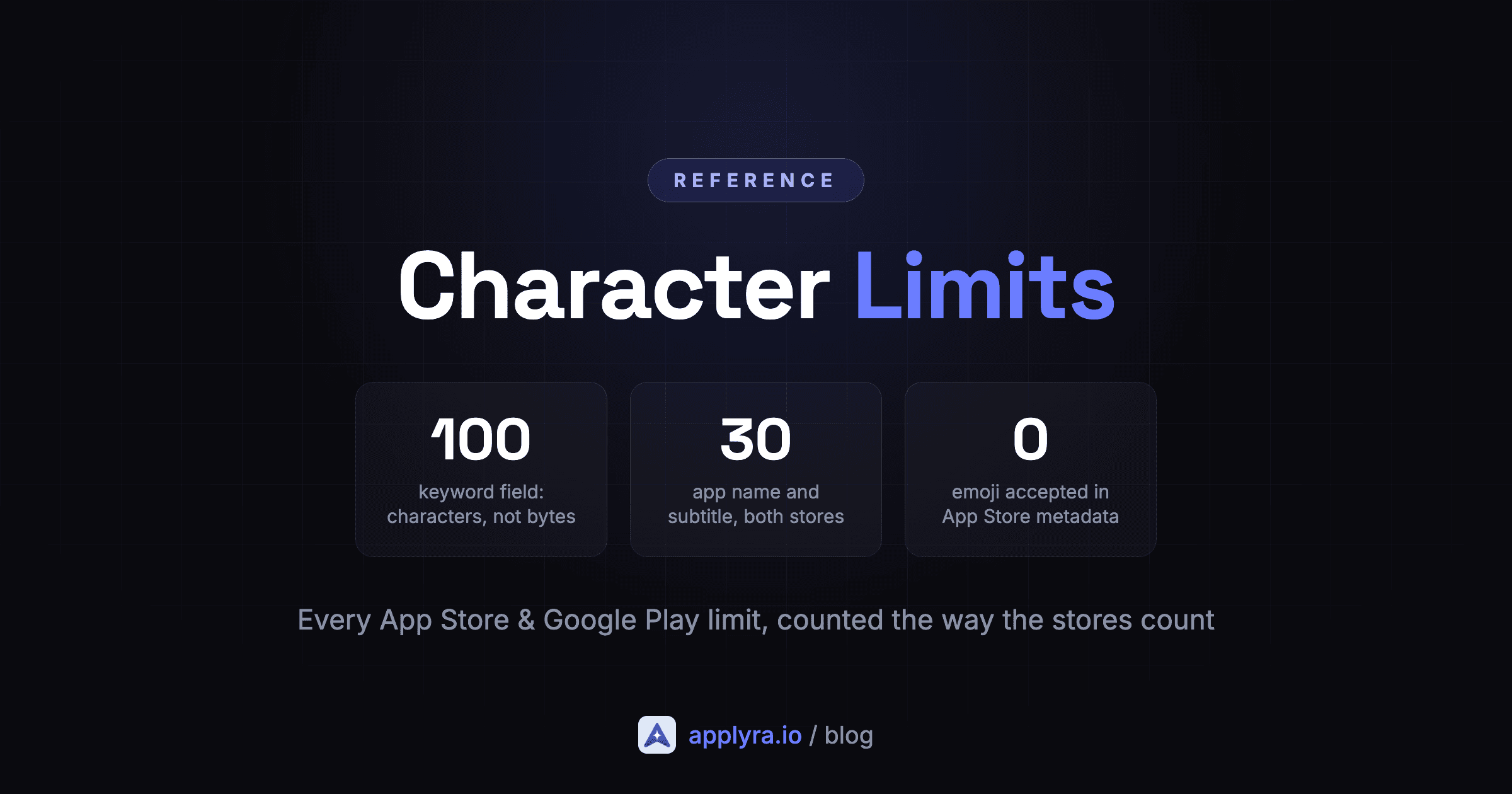
Both stores cap the app name and the iOS subtitle at 30 characters, so a title is a budget and every word in it is a choice. Here Photo Editor came out and Background Remover went in. Reading what a competitor removed is often more informative than reading what they added.
The old version is still there. Stores delete replaced creatives. Once a competitor swaps a screenshot, the file is gone from the store's servers and a link-based history quietly becomes a wall of broken images. Applyra keeps its own copy of every creative it captures, so the before stays viewable.
Then you put it on the ranking chart
A list of changes is trivia. A change plotted against its outcome is a lesson.
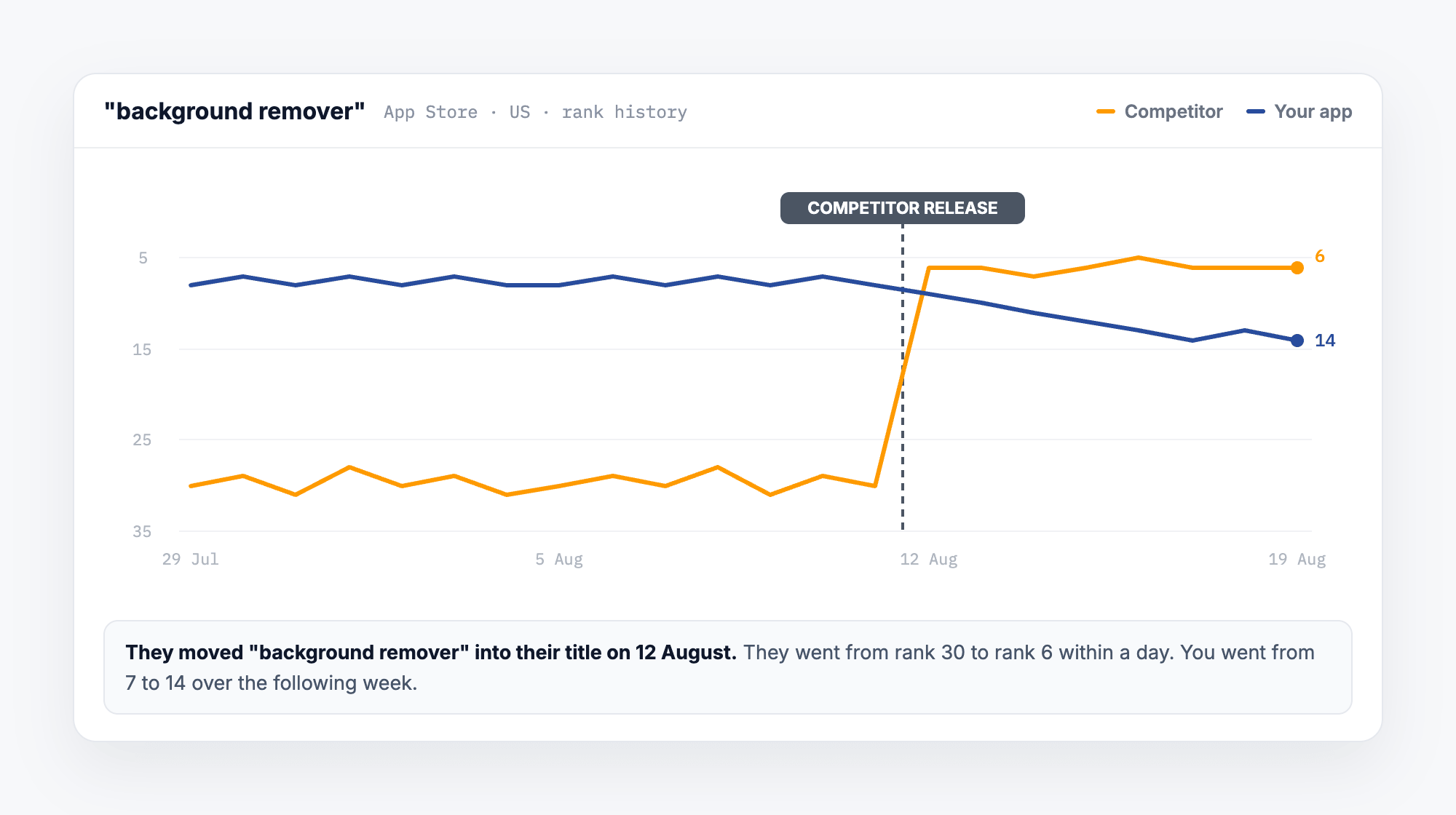
This is the whole point of dating the change. We measured more than 900 real metadata changes and found that a keyword entering the title gains 22 positions on iOS the same day the listing goes live. So when you know the date, the ranking move over the days that follow is not a coincidence you are squinting at. It is cause and effect, on one timeline.
That also tells you when to stop worrying. If a competitor shipped nothing and you still slipped, the cause is somewhere else entirely, which is a completely different investigation.
Why website change monitors fail on app store pages
Pointing a web page change monitor at a store URL is a reasonable instinct. It does not work, and it is worth knowing why before you spend a month training yourself to ignore the alerts.
The icon URL rotates when the icon does not
Apple re-hosts app icons under a new CDN path on most builds. Identical artwork, same pixels, new URL. A monitor comparing icon URLs will tell you your competitor rebranded, and it will say that for a large share of all releases. It is wrong nearly every time.
The fix is not clever, it is just work: fetch the image and compare the content, not the address. With one wrinkle. JPEG files carry metadata segments before the actual image data, and those bytes shift between encoder runs, so hashing the whole file recreates the same false positive in a new costume. You have to skip the metadata markers and hash the part that defines the picture. Applyra does exactly that, which is why an icon alert from it means the artwork genuinely changed.
Screenshots come from more than one place
iOS screenshots can be served through more than one pipeline, and the two describe the same creative with completely different URLs. A competitor can appear to have replaced their entire screenshot set overnight while having done nothing at all.
An empty response is not a removal
Both stores require screenshots, so an app cannot legitimately have zero. When a request comes back empty, the correct reading is "this request failed", not "they deleted everything". Without that guard you eventually get an alarming notification about a competitor stripping their store page, generated by a network hiccup.
One listing is not one listing
A listing is per country and per language. A competitor can ship a new subtitle in Germany and leave the US untouched, which is a common way to test copy. Watch only the US page and you never see it.
Why this matters more than it sounds
Every one of these traps produces the same failure: an alert stream with a high false positive rate. And an alert stream you have learned to distrust is worse than none, because now you ignore the real ones too. Getting this right is most of the work, and it is the reason competitor alerts are a product feature rather than a weekend script.
Know the day your competitor changes their listing
Applyra captures tracked competitors on the App Store and Google Play every day, notifies you when a field moves, and marks the date on your ranking chart. Free plan, no credit card.
Which competitor listing fields are worth watching?
Nine things change on a store listing. They are not equally interesting.
| Field | What it tells you | Signal |
|---|---|---|
| Title | A ranking move is coming, today | Highest |
| Subtitle / short description | Same, at roughly a third of the weight | High |
| Screenshots | A conversion test, or a repositioning | High |
| Icon | Rare, deliberate, usually part of something bigger | High |
| Release notes | The roadmap, in plain language | Underrated |
| Description | Positioning and feature claims | Medium |
| Preview video | Conversion work | Medium |
| Price / free-to-paid | Strategy change, loud when it happens | Medium |
| Version | Shipping cadence, and little else | Low |
Title and subtitle are the only ones that move rankings. They are the searchable fields and they work fast.
Release notes are the most underused intelligence on the page. Nobody writes release notes defensively. They are one of the few places a competitor simply tells you what they are building.
Meanwhile the field everyone asks about is the one nobody can see. The iOS keyword field is private, and you will never read a competitor's from any tool at any price. What you can do is watch which keywords they start ranking for and work backwards, which is the honest version of the same intelligence.
Do not trust the store's own update date
Both stores show a last-updated date. It is not the field-change date, and treating it as one misleads you in both directions.
It moves when a binary ships with no listing change, so you are told something happened when nothing did. And listing text can be edited without a new build, so the text can change while the date sits still. Version number and listing content are two different things the store happens to stamp with one date.
The only reliable answer is a daily record of the fields themselves.
A routine that takes ten minutes a month
Monitoring is only useful if it changes what you do.
Pick three to five real competitors. Not the category leaders you will never displace. The apps that appear next to you on your own keywords. Working out who those actually are is its own exercise, and it is rarely the list you would write from memory.
Let the alerts accumulate. Do not chase each one. A single competitor release is noise. Applyra groups the changed fields per competitor and can send them as an email digest rather than a stream.
Once a month, read the timeline as a story. Three subtitle edits in six weeks means they are hunting for a keyword and have not found it. A screenshot swap with no text change is a conversion test. Nothing for four months, then a title, an icon and a video on the same day, means a funded repositioning.
Copy the outcomes, not the moves. Plenty of competitor changes fail. What they tried tells you what they believe. What happened next tells you whether they were right. Only the second one is worth acting on, and that is exactly what the ranking chart above is for.
Check your own listing on the same rhythm. The fastest ASO win available to most indie apps is not out-thinking a competitor, it is noticing your own subtitle has carried a dead keyword since launch. While you are in there, our character limits reference has the real counting rules, which are not the ones the documentation states.
How to track competitor listing changes in Applyra
Add a competitor and their listing is captured daily on both stores. When a field moves you get an in-app notification and, if you want it, an email digest. The changed fields are grouped into one notification per competitor rather than one per field, so a release that touches the title, the subtitle and the screenshots does not arrive as three alerts.
Open it and you get the release timeline, each entry naming which fields changed, with the before and after side by side and the archived creatives preserved. The change dates are drawn on the ranking chart so you can read the impact on the same timeline.
The free plan tracks one competitor and shows you the signal: the date, the version, and which fields changed. The full field-by-field diff with the old text and archived creatives is on the paid plan at $9.99 a month, which also lifts the competitor limit. If you are weighing that against the alternatives, we compared the field honestly: competitor listing tracking starts at $399.99 a month on Appfigures.
The honest summary
Competitor monitoring is not a growth hack. It will not, by itself, move a single install.
What it does is remove guesswork from decisions you are already making. When a competitor overtakes you, you know whether they earned it with a title change or whether the store simply moved everyone around, which is a distinction we wrote a whole diagnostic around. When you are deciding what to test next, you can see which of their tests survived and which quietly got reverted three weeks later.
Small edge. Almost free. Compounds. And the alternative is opening a store page every few weeks and trying to remember what it used to say.
Frequently asked questions
How do I track when a competitor changes their app store listing?
You need a daily snapshot of their listing and a field-level comparison against the previous one. The stores give you no changelog and no notification. Applyra captures tracked competitors on the App Store and Google Play every day, then sends an in-app notification and an email digest naming exactly which fields moved.
Why do generic website change monitors fail on app store pages?
Because the page is not the listing. App store pages are rendered from an API, they vary by country and language, and their image URLs rotate without the artwork changing. A generic monitor fires on cosmetic differences and misses the edits that matter, so you get constant alerts with almost no signal in them.
Does a competitor's app icon really change every build?
The artwork usually does not, but the URL does. Apple re-hosts the identical icon under a new CDN path on most builds, so a monitor comparing icon URLs reports a logo change that never happened. Applyra compares the image content itself rather than the address, which is why its icon alerts stay rare and real.
Which competitor listing fields are worth watching?
Title and subtitle first, because they are the searchable fields and they move keyword rankings within a day. Then screenshots and icon, which affect conversion rather than ranking. Release notes are underrated: competitors often state their roadmap there in plain language. Price changes and category moves are rarer but strategically loud.
How quickly does a competitor's metadata change show up in the rankings?
Almost immediately. Applyra measured more than 900 real listing changes: a keyword entering the title gained 22 positions on iOS on the first daily reading after it went live. So if you catch the change date, the ranking move that follows is genuinely attributable rather than a guess.
Can I see what a competitor's listing looked like before the change?
Only if something archived it at the time. Stores serve the current listing and nothing else, and old screenshot files are deleted once replaced. Applyra keeps its own copy of each captured creative, so the before and after stay viewable side by side long after the store has moved on.
Ready to optimize your app?
Start tracking keywords and improving your app visibility on both stores - free, no credit card required.