Search Google for "App Store promotional text" and the top result is a Reddit thread from a developer asking whether the field affects ASO at all. Apple's documentation answers it in one line. Plenty of developers still don't believe it, and I get why: a text field Apple shows on your page but search ignores sounds odd.
So we tested it on live store data, the way we measure everything at Applyra. On 3 November 2026 we read the promotional text of 1,081 apps from the top US App Store charts, then searched the App Store for words that appeared only in that field. Apple is right. The bigger surprise was how few top apps use the field at all, which leaves a lot of room for indie apps.
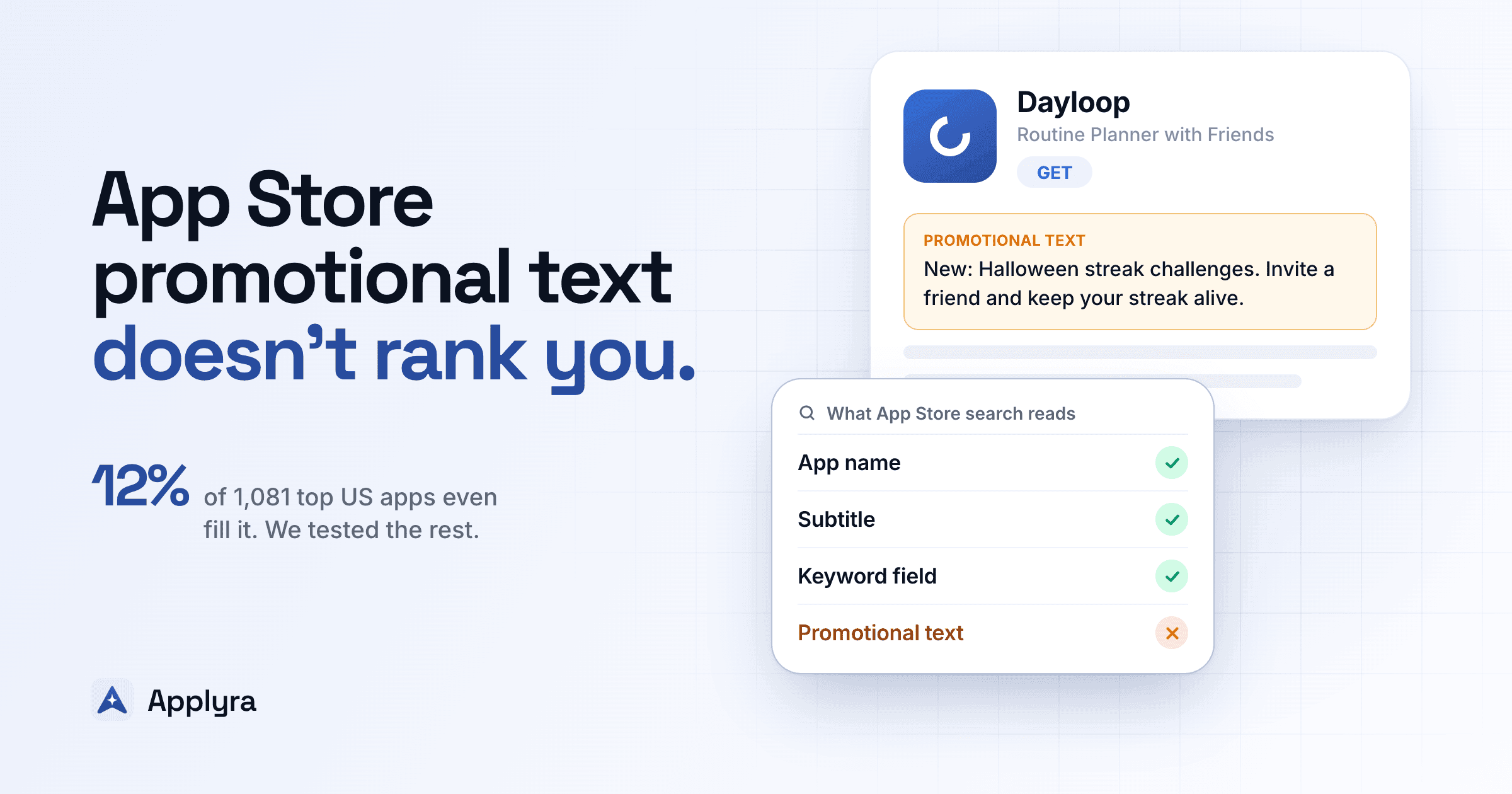
12%
of 1,081 top US apps fill promotional text
24% vs 5.6%
subtitle words vs promo words that rank
170
characters, editable without a new version
The short version
Promotional text won't rank you, so keep your keywords in the name, the subtitle and the keyword field. Use the 170 characters for something time-bound that makes people tap Get. Want to see which of your words search reads? Check your listing in Applyra for free.
What App Store promotional text is
Promotional text is a 170-character field in App Store Connect that shows at the very top of your description on the product page. Four things set it apart:
- You can change it without a new version. Your title, subtitle, keywords and description all wait for your next submission. Promotional text goes live as soon as you save it.
- It's per localization. Every language gets its own 170 characters, and each custom product page can have a different one.
- It sits in the lines people read. The description block is cut off on the product page, so its opening lines are what a visitor sees before tapping "more". Set promotional text, and that opening is yours to write.
- Search doesn't index it. Apple's search documentation says so directly: promotional text doesn't affect your app's search ranking and shouldn't be used to display keywords.
| Field | Characters | Indexed for search | Editable without a new version |
|---|---|---|---|
| App name | 30 | Yes | No |
| Subtitle | 30 | Yes | No |
| Keyword field | 100 | Yes | No |
| Promotional text | 170 | No | Yes |
| Description | 4,000 | No | No |
Every limit for both stores, and how each one is counted, is in our character limits reference.
Does promotional text affect App Store rankings?
Apple says no. Here's how we checked.
You can't see another app's hidden keyword field, so one app on its own proves nothing. Comparing groups of words across many apps does. For each of the 132 top apps with promotional text, we took up to three words that appeared in that text and nowhere in the app's name, subtitle, developer name or category. Then we built two control groups from the same apps:
- Subtitle-only words, which Apple indexes. If the test can see an indexed field, these should rank.
- Description-only words, which Apple doesn't index on iOS. They show what "not indexed" looks like.
We searched every word on the US App Store and noted whether the app appeared in the results, which go about 250 apps deep.
| Where the word appears | Words tested | App ranks anywhere | App ranks top 10 |
|---|---|---|---|
| Subtitle only | 116 | 24.1% | 12.1% |
| Promotional text only | 375 | 5.6% | 2.7% |
| Description only | 396 | 1.5% | 0.3% |
A subtitle word got its app into the results four times as often as a promotional text word, and into the top 10 four and a half times as often. Promotional text behaves like a field search doesn't read.
Promotional text words still did a bit better than description words, so we looked at the ten that put an app in the top 10. Five are variants of a word already in the name or subtitle: "invoicing" for an app called Invoice2go, "faxes" for one called FaxFree, "deliver" next to "delivering" in a subtitle. The other five are the app's core category term, like "privacy" for a privacy browser or "payday" for a cash advance app, and those apps almost certainly have them in their hidden keyword field too. None of the ten needs promotional text to explain the ranking.
Why the subtitle only scores 24%
An indexed word only gets you into the results if your app is strong enough for it. Single words like "calls" or "news" are fought over by thousands of apps, so plenty of subtitle words don't rank either. That's why the test compares groups instead of reading one number. Same apps, same storefront, same day: the only thing that changes is the field the word sits in.
The practical conclusion is Apple's own: don't spend promotional text on keywords. A word that matters for search belongs in the name, the subtitle or the keyword field, and our App Store keyword research guide shows how to choose and place it. Applyra's ASO Health score follows the same logic: on iOS it measures keyword coverage in the name, the subtitle and the keyword field, the three fields search reads.
What 1,081 top US apps do with promotional text
Most of them leave it empty. Only 132 of the 1,081 apps, 12.2%, fill the field. Games use it a little more (14%) than other apps (12%). Spotify, Duolingo, Headspace, Calm, Notion, Candy Crush and Monopoly Go all leave it blank.
Apps that do fill it use most of the room: the median promotional text runs 133 characters, and a quarter of them reach 159 or more. We read all 132 and sorted them by what they're for:
| What the promotional text does | Share | Real example |
|---|---|---|
| Restates what the app does | 63% | "Manage your health care in one easy place" (Aetna Health) |
| Offer, trial or bonus | 10% | "Subscribe to the #1 invoicing app and get the first 30 days free!" (Invoice2go) |
| New feature or update | 10% | "Check out the new look! It adapts to your iPhone's text size and puts all tools upfront for easier cleaning." (Cleaner Kit) |
| Social proof | 8% | "Sleek and user-friendly" - FLYING Magazine (ATC - Live Air Traffic) |
| Event or season | 7% | "All-new Halloween theme and support for newest devices" (Streaks) |
| Something went wrong | 2% | "HOW TO USE TAPCOOK", a heading pasted on its own (TapCook) |
Apple suggests using the field for "the latest news about your app, such as limited-time sales or upcoming features". About a quarter of the apps that fill it do that. Six in ten use it as a second subtitle and restate what the app does, right below the subtitle itself. A few get it plainly wrong, like the remote control app that shows French promotional text on the US English storefront.
Now look at it as a solo developer. Of the top charts, 88% leave the field empty and most of the rest waste it, yet it's the most visible text on the page after your subtitle. If you've got a launch, an update, a trial or a holiday theme, you have something to say there that the big apps aren't saying.
Put your keywords where search reads them
Draft your title, subtitle and keyword field in Applyra's Metadata Simulator and get an ASO Health score before you ship, then track every keyword daily on both stores. Free plan, no card.
How to write App Store promotional text (with examples)
Give a reason to download today. Your subtitle says what the app is. Your promotional text should say why now: a free trial, an event that ends Sunday, a feature you shipped this week.
Change it often. It costs nothing and needs no new version, so it's the one part of your page you can keep current. A simple rotation for an indie habit app could look like this:
| When | Promotional text |
|---|---|
| Launch week | "New: build routines with friends. Invite one person and keep each other's streaks alive." |
| A new feature | "Now with home screen widgets: check off today's habits without opening the app." |
| January | "Start the year with a 30-day streak challenge. Free for every new account this month." |
Use it for proof. Apple recommends putting accolades at the end of the description or in the promotional text. An award or a press quote fits well here, in the lines people read.
Don't repeat your subtitle or the first sentence of your description. Both are already on screen, and repeating them wastes the most visible text on your page.
Don't write keywords. They won't rank you, as the test showed, and a comma list in the most visible line of your page reads as spam to someone deciding whether to download.
Localize it. Since it's per localization, you can run an offer in one market, or a holiday only one country celebrates, without touching the others.
Where your keywords should go instead
If you came here hoping for 170 extra characters of keywords, here's where that room is:
- Your name, subtitle and 100-character keyword field, which give you 160 indexed characters per localization. The keyword research guide fills them on a real example.
- Your screenshot captions, which Apple has read since mid-2025. Our guide to screenshot captions as a keyword field covers where to put them.
- Extra localizations, each one with its own set of indexed characters.
Short on time? Applyra's AI suggestions draft a title, a subtitle and a keyword field from your tracked keywords and their real difficulty, inside the store's limits. The Metadata Simulator then scores the draft before you ship it.
Search never reads your promotional text, but every visitor who opens your page does, and you can change it any day. Write it for them, and let Applyra track how your keywords respond to everything else you change, every day, on both stores.
How we tested
On 3 November 2026 we collected 1,081 unique apps from the US App Store charts (top free, top paid and top grossing overall, plus top free and top grossing in 23 categories) and read each app's name, subtitle, description, developer name, categories and promotional text as the US storefront serves them. We cross-checked the promotional text against each app's public product page on a sample of 25 apps, and all 25 matched.
For the ranking test we kept the 132 apps with promotional text. A word counted as "only in the promotional text" if it had at least four letters, wasn't a common filler word and didn't appear, singular or plural, in the app's name, subtitle, developer name or categories. Control words were picked the same way from the subtitle and the description of the same apps, leaving out any word from the promotional text. We searched each word once on the US App Store the same day and recorded where the app ranked, in results about 250 apps deep.
The test is deliberately conservative. A promotional text word that ranks may also sit in the app's hidden keyword field, which can only push the promotional text result up. It still came out four times below the subtitle.
Frequently asked questions
Does App Store promotional text affect search rankings?
No. Apple's guidance says promotional text doesn't affect search ranking, and Applyra's test on 129 top US apps agrees: a word that appeared only in an app's promotional text brought that app into the search results for that word 5.6% of the time, against 24% for a word that appeared only in its subtitle.
How many characters can App Store promotional text have?
Up to 170 characters per localization. Apple counts characters, not bytes, so a Japanese or Thai promotional text gets the same 170 as an English one. App Store Connect refuses emoji in this field, as it does in every other metadata field.
Can you change App Store promotional text without releasing a new version?
Yes. It's the one product page field you can edit at any time without submitting a new build, which makes it the place for limited-time offers, events and launch news. Each localization and each custom product page can have its own promotional text.
What should I write in App Store promotional text?
A reason to download today that the rest of your page doesn't already give: a current offer or free trial, a seasonal event, a feature that just shipped, or proof such as an award. Among top US apps that fill the field, six in ten just restate what the app does, which repeats the subtitle in the most visible lines of the page.
Is there promotional text on Google Play?
Not as a field. The closest thing on Google Play is the 80-character short description, and unlike Apple's promotional text it's indexed for search. For time-limited offers and events, Google offers promotional content in the Play Console.
Ready to optimize your app?
Start tracking keywords and improving your app visibility on both stores - free, no credit card required.