Release history: what counts as a change
Applyra logs a release on any store listing change, not only a version bump: title, subtitle, description, release notes, icon, screenshots, video, pricing.
Video transcript
In Applyra, a release is any change to a store listing, not only a new version number. Title, subtitle, description, release notes, icon, screenshots, preview video, pricing: each change is logged with the day it appeared and what it replaced. Most ASO work ships without a new build. A log keyed on version numbers would miss every one of those changes. Ratings aren't logged: they drift every day, and would bury the real changes. And a log is only worth reading if it stays quiet when nothing happened. The stores' own churn never reaches your timeline. On a competitor, the comparison screen's Release history gives the timeline, newest first, next to the current listing. Expand a change to see the fields that moved. On the paid plan, you get the before and the after. On your own app, each change is a dot on the visibility chart, so a release and its effect share one axis. A competitor's update also reaches your notifications, and the daily email. And look at the markets. A change in one country only is a test, worth watching before you copy it.
A release, in Applyra, is any change to a store listing. Not only a version bump. Title, subtitle, description, release notes, icon, screenshots, preview video and pricing all count, and each one is logged with the day it appeared and what it replaced.
That definition is the useful one. Most ASO work ships without a new build: a subtitle rewrite, a first screenshot swapped, a price test. Those are the changes that move rankings, and a log keyed on version numbers would miss every one of them.
What is tracked, and what is not
| Logged as a change | Not logged |
|---|---|
| Version, title, subtitle, description, release notes | Rating and review counts |
| Icon, screenshots, preview video | |
| Price, free or paid, currency |
Ratings drift continuously, so folding them into release history would bury the real changes under daily noise. The listing fields themselves are described in metadata fields.
Why the alerts can be trusted
A change log is only worth reading if it is quiet when nothing happened, and that is where Applyra spends its effort.
The stores generate a lot of movement that nobody decided. Assets republished untouched between two builds, a store that answers badly for a minute: none of it is a release, and none of it reaches your timeline. Applyra compares what a listing actually says and shows, so a genuine redesign fires an alert and a technicality stays quiet.
That is the difference between a log you open every morning and a feed you learn to ignore.
Where you see it: your app, a competitor, your notifications
On your own app, every logged change becomes a dot on the visibility chart of the app page. Hover one and it names the version and the fields that moved. This is the fastest way to answer "did my rewrite do anything", because the release and the visibility score sit on the same axis.
On a competitor, the Release history panel of the comparison screen gives a timeline, newest first, with the current listing beside it. Expand a change and you get the fields that moved; on the paid plan, the before and after of each one, including the previous screenshots and icon.
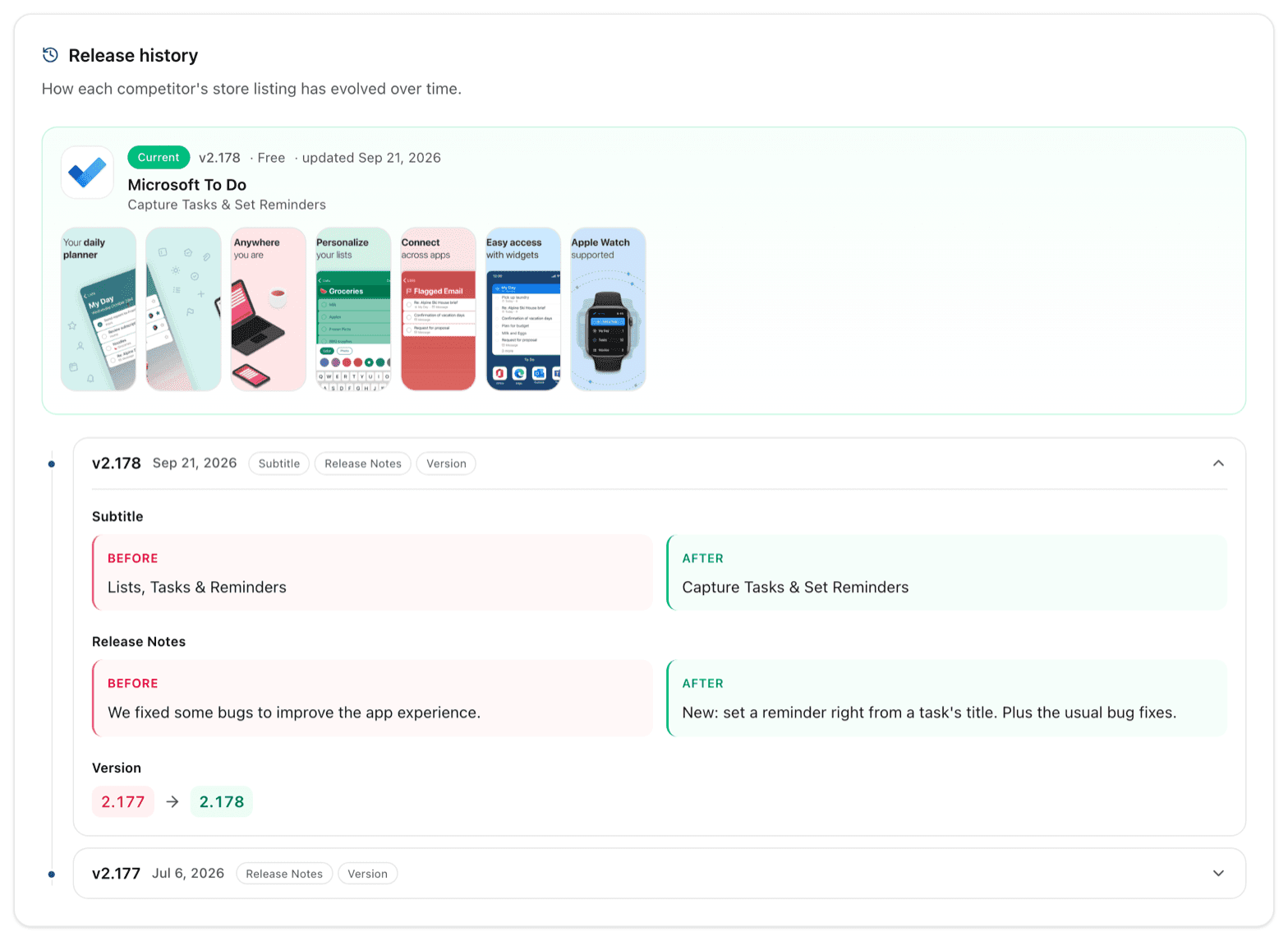
In your notifications, a competitor update arrives in the bell as the number of changes, the markets touched and which fields moved, and in the daily digest email. Both are covered in release alerts, and the email can be turned off in email preferences.
Reading a change
Two habits make the log pay for itself. First, check what changed before assuming a competitor shipped something meaningful: a release notes edit and a full screenshot rewrite land in the same timeline and mean very different things. Second, look at the markets. A change logged in one country and not the others is a test, and a test you can watch for three weeks before deciding whether to copy it.
For who to watch in the first place, see competitors.
Frequently asked questions
Does a release mean a new version number?
No. Applyra logs a release on any change to the store listing: title, subtitle, description, release notes, icon, screenshots, preview video, pricing, or the version. Most ASO moves ship without a version bump, and those are exactly the ones worth catching.
Will Applyra alert me for a change the developer did not actually make?
No. A release is logged when the listing itself changed, and the cosmetic churn the stores generate on their own is never reported as one. An entry in the timeline is always something somebody shipped.
What does release history show on the free plan?
The signal: the date, the version and which fields changed on every release it logs. The paid plan adds the before and after values for every field, including the previous screenshots and icon, and the full history.
How far back does an app's release history go?
It starts the day the app was first added to Applyra. The complete listing is recorded at that moment as the baseline, so the first change after that is measured against something real rather than against a gap.
Last updated on