How to show your app's store ranking on your website
Put a verified badge on your site that shows where your app ranks on the App Store or Google Play, checked every day, with a page anyone can open to check it.
Video transcript
Saying your app ranks well is easy. Proving it is something else. In Applyra, open Verified badge, in the menu under your name. Pick an app and a market. The list holds every keyword where your app sits in the top 25, best first. Or choose No ranking: the badge then only says your rankings are verified daily, without naming a keyword. Pick the ranking to show, and create the badge. Only that ranking becomes public. Nothing else. Four formats: a card for a portfolio, a laurel for your landing page, a badge for your README, and an image to post. Copy one snippet onto your site. It's a single image, no script, and it updates itself every day. One click opens a public page where anyone can check the number: the store, the country, the last check. And Applyra lists the sites showing your badge, all by itself.
A verified badge puts one of your app's real rankings on your website, for example #2 in App Store search for "to do list" in the United States. Applyra checks that position every day, so the badge always shows the latest one, and a click on it opens a public page where any visitor can see where the number comes from. You create it on the Verified badge screen, in the menu under your name, and paste one snippet on your site.
Create a badge
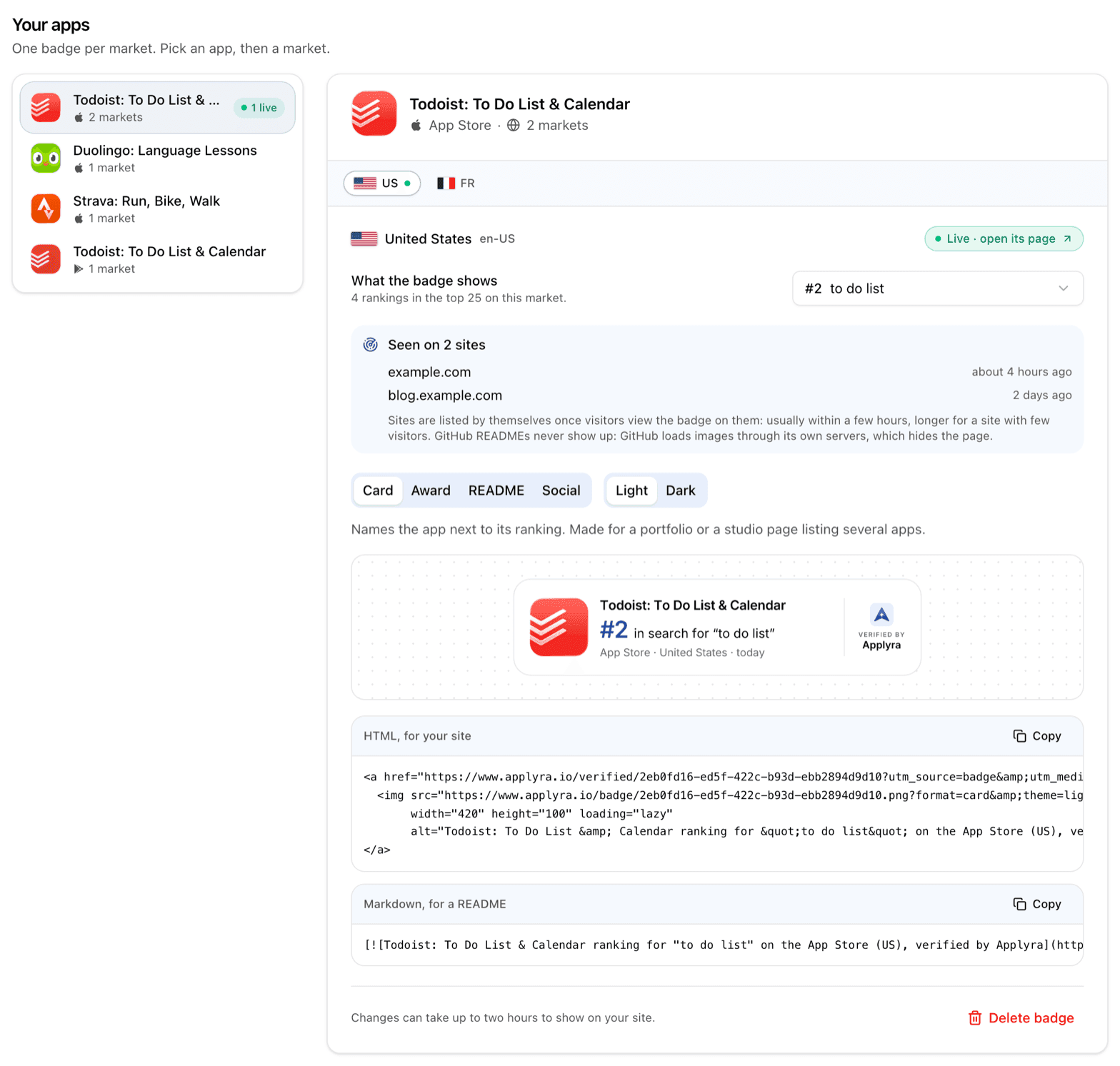
A badge belongs to one market: one app, on one store, in one country. The screen lists your apps on the left, and the markets of the app you pick as tabs on the right, each with a dot when its badge is live.
- Open Verified badge in the menu under your name, at the bottom of the sidebar.
- Pick the app, then the market.
- Under What the badge shows, choose a ranking. The list holds the keywords where the app is in the top 25 on that market, best position first. You can also choose No ranking, just that it is verified, which shows that the app's rankings are checked daily without naming a keyword.
- Select Create badge.
Creating the badge is what makes it public. You can change the ranking at any time from the same list, and the badge keeps its address, so a snippet you have already pasted keeps working.
Rankings come from the store's own search results, the same data as the Keywords Tracker. A market needs keywords with positions before it has anything to offer: see tracking an app and following it across markets.
Choose a format
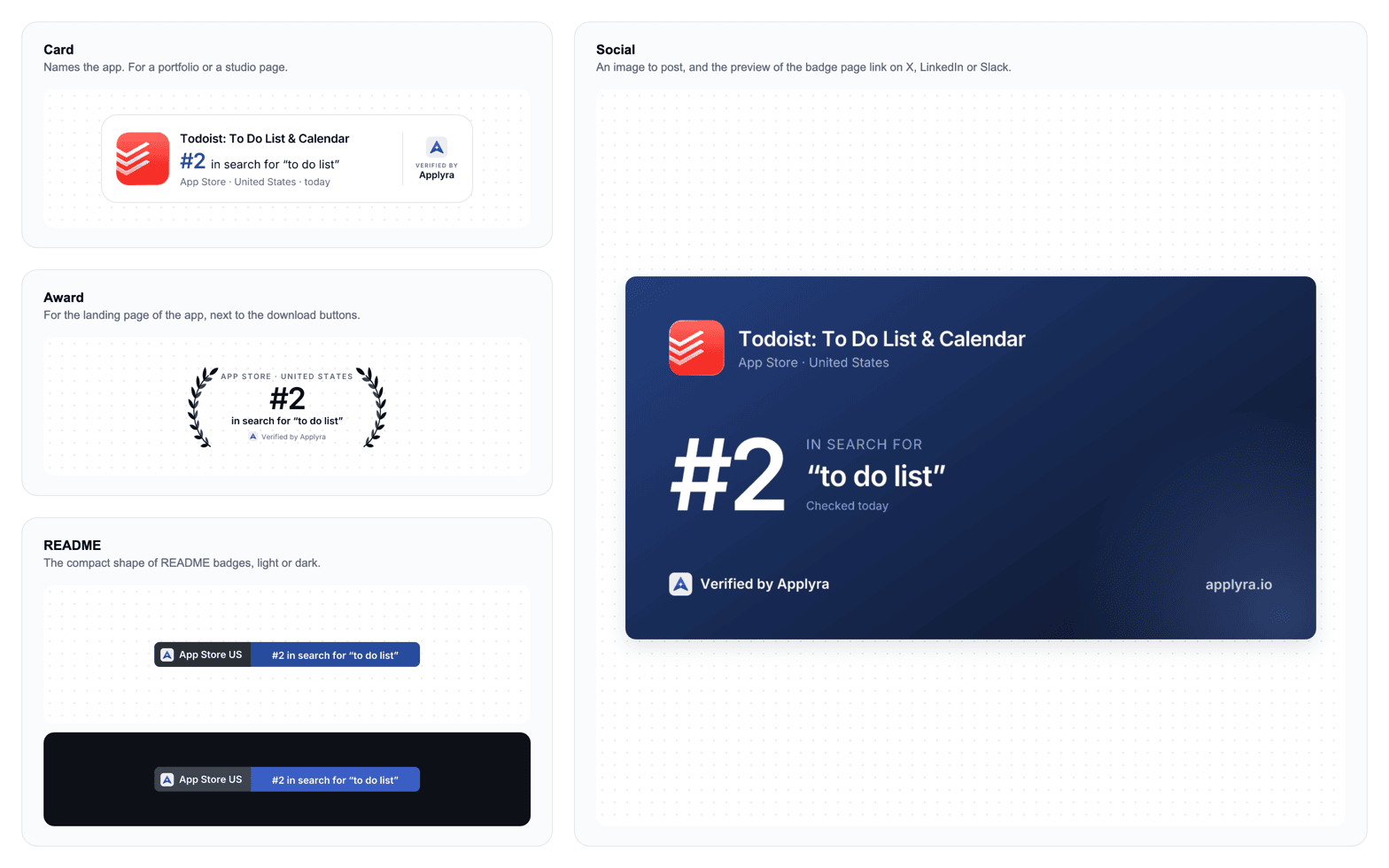
Four formats, each drawn from the same live ranking. The first three come in a light and a dark version, to match the page they sit on.
| Format | Where it fits | What it shows |
|---|---|---|
| Card | A portfolio or a studio page listing several apps | The app's icon and name, the position and keyword, the market |
| Award | The landing page of the app, next to its download buttons | A laurel around the position and keyword, on a transparent background |
| README | A GitHub README | The compact two-part shape of README badges |
| Social | A post on X or LinkedIn | A large image with the app, the position and the keyword |
Put it on your site
Each format comes with two snippets, HTML, for your site and Markdown, for a README. Copy one and paste it where the badge should appear. It is a single image wrapped in a link, with its width and height declared and lazy loading: no script, nothing that shifts or slows the page.
The badge updates itself. A new position, or a change of keyword on your side, reaches every site showing it within about two hours.
If the keyword leaves the top 25, the badge does not show a weaker number. It switches to saying that your search rankings are verified daily, and you can pick another ranking whenever you like.
What visitors see when they click
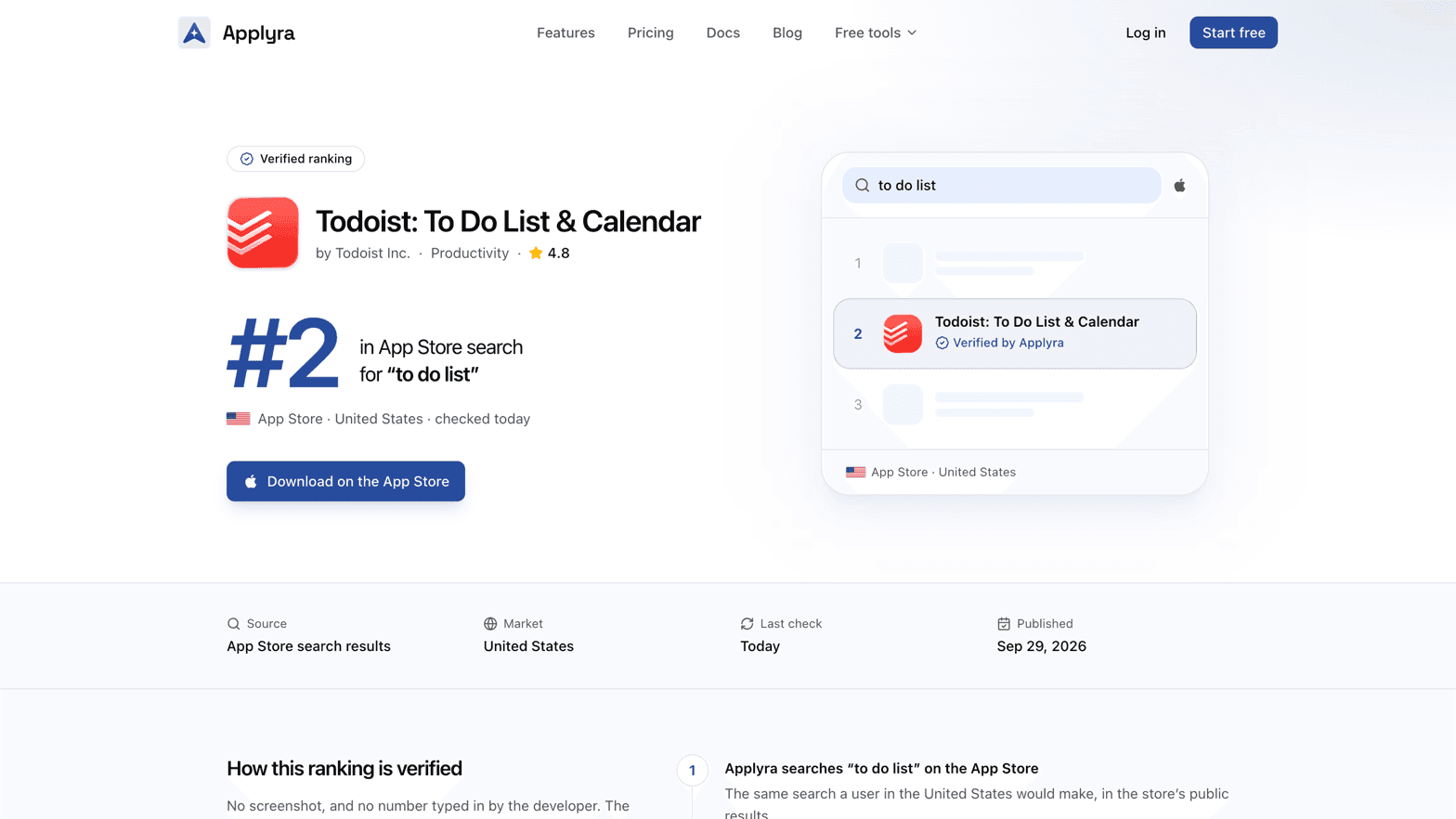
The badge links to a public page for that ranking, made to be shown. It carries the app's icon, name, developer and category, the position in large type, the store and the country, the day of the last check and the day the badge was published, and a button to the app's store page. Once the app has held its place for weeks, the page says so, for example "Top 10 for 42 days straight".
It also explains how the ranking is verified, from the store's own public search results: nobody types the number in.
What stays private
Only the ranking you picked is public: the keyword, its position, the store and the country. The rest of the app's keywords, its scores and its competitors never appear on the badge or its page. The app details on the page are the ones its store listing already shows.
See where your badge is shown
Once a badge is live, the screen lists the sites it was seen on, with how long ago. A site shows up by itself once visitors view the badge on it: usually within a few hours, longer for a site with few visitors. Badges in a GitHub README never appear there, because GitHub loads images through its own servers. The counters above the list show your live badges and the sites that showed one in the last 30 days.
Share it
The Social format adds a post written for you, which you can edit, with three buttons: Post on X, Share on LinkedIn (LinkedIn takes a link and no text, so the button copies the text first) and Download image. The link in the post opens the badge page, which previews with the same image on X, LinkedIn or Slack.
Remove a badge
Delete badge, at the bottom of the market's panel, asks for a confirmation first. Once deleted, every site showing the badge displays "Badge unavailable" within about two hours, and its page goes offline. A new badge gets a new address, so the snippets already pasted cannot be brought back.
Badges are available on every plan, one per market you track. See plans and limits for how many apps and markets your plan follows.
Frequently asked questions
Can I show my app's App Store ranking on my website?
Yes. Applyra's verified badge shows one ranking your app holds, such as #2 in App Store search for "to do list" in the United States, checked every day, and links to a public page where any visitor can see where the number comes from.
Does the ranking badge slow down my website?
No. It is a single image with its size declared and lazy loading, and no script, so it never shifts or delays the page it sits on.
What happens to the badge if my ranking drops?
The badge never shows a position outside the top 25. If the keyword falls out of it, the badge stops showing a number and says your search rankings are verified daily, until you pick another ranking.
Which of my app's data does a verified badge make public?
Only the one ranking you pick: the keyword, its position, the store and the country. Your other keywords, your scores and your competitors stay private.
How do I remove a verified badge from my site?
Delete it on the badge screen. Every site showing it displays "Badge unavailable" within about two hours and its page goes offline. A new badge gets a new address, so it cannot bring the old snippets back.
Last updated on