Compare your app with a competitor, keyword by keyword
The comparison page puts your app against up to three competitors: visibility over time, who leads which keyword, tracked positions, screenshots and ratings.
Video transcript
Open a tracked competitor, and Applyra builds one page for that matchup: both visibility scores over time, then six tabs. Each app gets a colour, the range is yours to pick, and a hollow dot marks every day a listing changed, on your side and theirs. You can put up to three competitors on the page, and drop one without leaving it. Head-to-head opens by default. It takes the terms both apps are built around, minus their brand, and sorts each one: you lead, they lead, or neither ranks yet. The bar gives the split at a glance: a threat, or a footnote? Each row gives traffic, difficulty, their position and yours. Not ranking means nobody scrolls that far. They lead is where your gaps are. Filter on it, and track any term in one click. Tracked keywords is the mirror: your own keywords, their position next to yours, red when they're above you. Screenshots puts both listings' creative side by side. The first two are what a visitor judges you on. Ratings lines up the average, the count, the last update and the category, and badges whoever leads. On the free plan, the head to head shows the three biggest terms where they beat you. Unlimited shows every term.
Open any tracked competitor and Applyra builds a single page for that matchup: both visibility scores plotted over the period you choose, then six tabs covering keywords, releases, creative and ratings. It is the page that tells you which searches you are losing to them and which ones you already own, and you can put up to three competitors on it at once and drop one without leaving the page.
The chart at the top is the summary. Each app gets a colour, the Y axis is the visibility score, and the date range is yours to pick. Small markers on the line show the days a listing changed, on your side and theirs, so a divergence and the release that caused it sit on the same X. The free plan can look back 7 days, the paid plan as far as the data goes.
Head to head: who leads which keyword
This is the tab that opens by default, and the one worth your time. It takes the shared niche, meaning the terms your app is built around plus the terms the competitor is built around minus their own brand name, looks up where each of you sits in the day's results, and sorts every term into three buckets:
- You rank ahead. You sit above them, or they do not rank at all.
- They rank ahead. They sit above you, or you are not in the results at all. These are the gaps.
- Neither ranks yet. Open ground in your own niche that nobody has claimed.
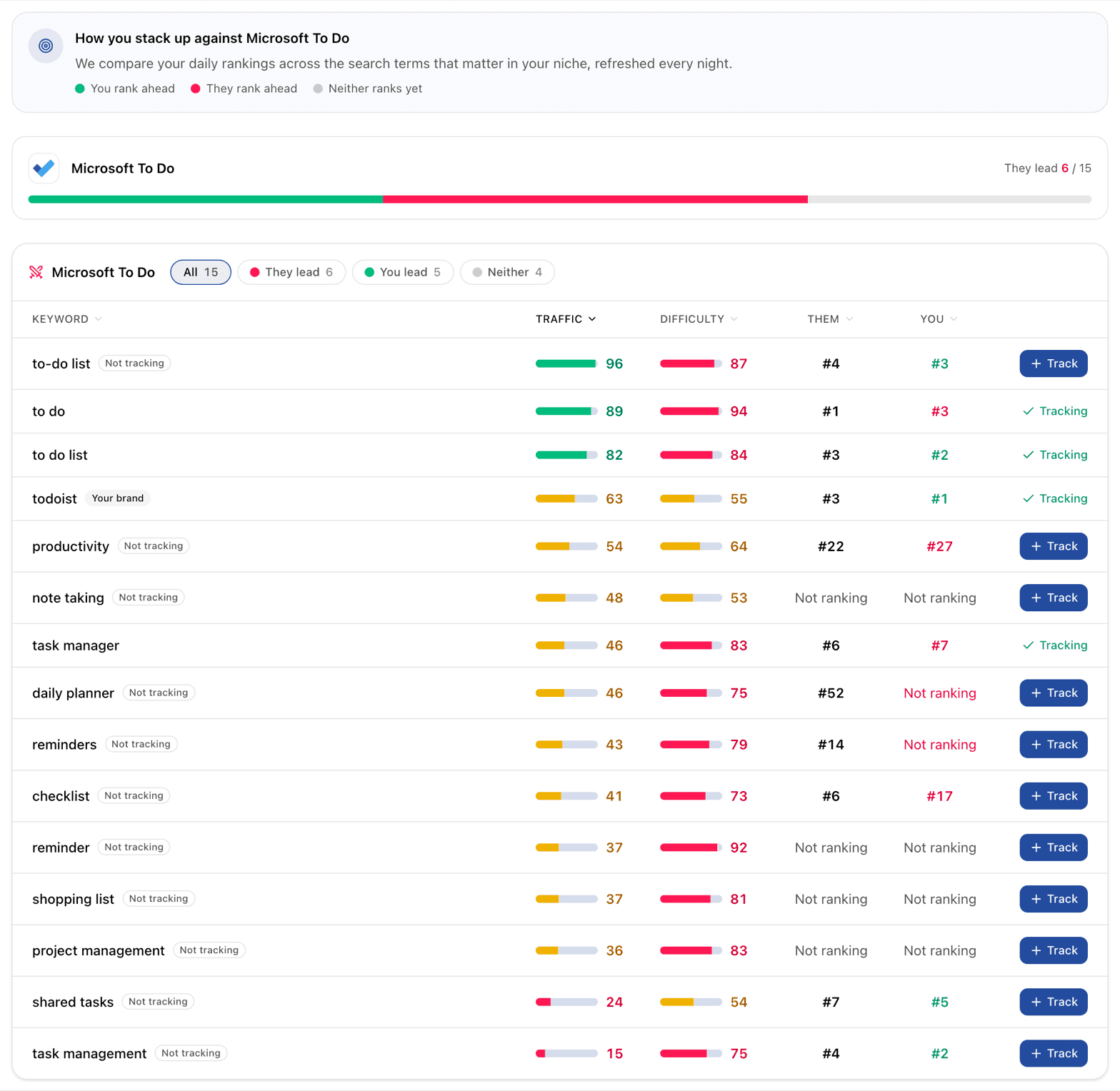
A recap card per competitor shows the split as a bar, so a single glance tells you whether this rival is a threat or a footnote. Below it, the table lists every term with its traffic score, its difficulty score, their position and yours. A term an app does not show up on reads "Not ranking", because a position nobody scrolls to is not a position.
Rows are ordered by traffic first, so the top of the table is where the volume is. Your own brand term is labelled, and so is any keyword you are not tracking yet. That second badge is the useful one: every row has a Track button that adds the term to your keyword tracker without retyping it.
Tracked keywords
The second tab is the mirror image. Instead of the niche both apps are built around, it lists the keywords you chose to track and puts each competitor's position next to yours, with your daily movement. Their number is coloured against yours, red when they are above you, green when you are above them.
Use the head to head tab to find what to target and this one to check whether the targeting worked. Rank history has the long view of the same positions.
Screenshots and ratings
The screenshots tab lays out the current store creative for your app and each competitor as carousels, in the same place, at the same size. It is the cheapest competitive review there is: the first two screenshots are what a store visitor actually judges you on.
The ratings tab compares average rating, how many ratings, last update date and category in one table, with a Best badge on whichever competitor holds the top rating and a Most badge on the one with the most ratings. Read those counts inside one store: an App Store rating count and a Google Play review count are different quantities under the same word, which why Applyra shows a different number from the store covers. A large deficit here deserves a plan of its own: reputation is the part of a listing you cannot rewrite in an afternoon, and it shapes what happens after someone finds you.
What each plan sees
| Free | Paid | |
|---|---|---|
| Score chart history | 7 days | Everything |
| Head to head gaps | The top 3 terms where they lead you | Every term, filterable by bucket |
| Tracked keywords, screenshots, ratings | Included | Included |
| Release history detail | Which fields changed | Before and after, full timeline |
| AI briefing | Example preview | Generated on your data |
The free teaser is deliberately the three highest-traffic keywords where the competitor beats you, rather than a random sample. If those three do not convince you the comparison is worth paying for, nothing further down the table would have.
Next: the AI briefing turns all of this into a plan, and release alerts tell you the day it changes.
Frequently asked questions
How do I compare my app to a competitor on the App Store?
Open a tracked competitor from Competitors Analysis. Applyra opens one page with the visibility scores of both apps over time and six tabs: Head-to-head, Tracked keywords, Release history, Screenshots, Ratings and AI insights.
Which keywords does the head to head tab compare?
The head to head tab compares the shared niche: the terms your app is built around plus the terms the competitor is built around, minus their own brand name. Applyra sorts each one into you rank ahead, they rank ahead, or neither ranks yet.
Can I compare several competitors at once?
Yes. Applyra puts up to three competitors on the same comparison page, each with its own colour on the score chart and its own recap card in the head to head tab.
Last updated on