Niche Analysis: size up a category before you build
Type a topic and Niche Analysis returns the sub-niches inside it, each scored on traffic, competition and market gap, with its keywords and the apps in it.
Video transcript
Niche Analysis answers the question before any code: is there room in this category, and where exactly? Type a topic, pick the store and the market, and run it. The progress bar names each stage: finding the keywords, measuring them, grouping them into niches, scoring them, and writing the insights. It returns the sub-niches inside your topic, each one an app you could build, with its intent. Each niche gets an opportunity score out of 100: Excellent from 70, Good from 50, Moderate from 35, Low below. It reads five things at once: traffic, competition, market gap, dissatisfaction and growth. And no weakness in the incumbents rescues a topic nobody types. Four numbers back it up: traffic, difficulty, how many competitors, and their average rating. A low rating means unhappy users. Then the top apps, every keyword with a link to inspect it, and the insights: the gap, the money, the angle and the risk. Every analysis stays in your history. The free plan includes one a month; Unlimited runs as many as you need, and exports the full report as a PDF. When a niche looks right, take its keywords into your tracker, on the app you decide to build.
Niche Analysis answers the question you ask before writing any code: is there room in this category, and where exactly. You give it a topic, a store, a country and a language. It comes back with the sub-niches inside that topic, each scored from 0 to 100, each with the keywords that define it and the apps already holding them.
It sits in the Tools group of the sidebar, under Niche Analysis.
How a run works
The progress bar names each stage as it happens, so you watch the work rather than a spinner:
- Keyword Discovery. Real store searches around your topic, the apps that come back, and the words those apps are built on.
- Data Retrieval. Every discovered keyword gets its traffic and difficulty scores, the same two you see everywhere else in Applyra.
- Niche Identification. The keywords are grouped into sub-niches, each one an app concept rather than a bag of words.
- Opportunity Scoring. Each niche gets its score out of 100.
- Market Insights, written per niche.
What a niche card contains
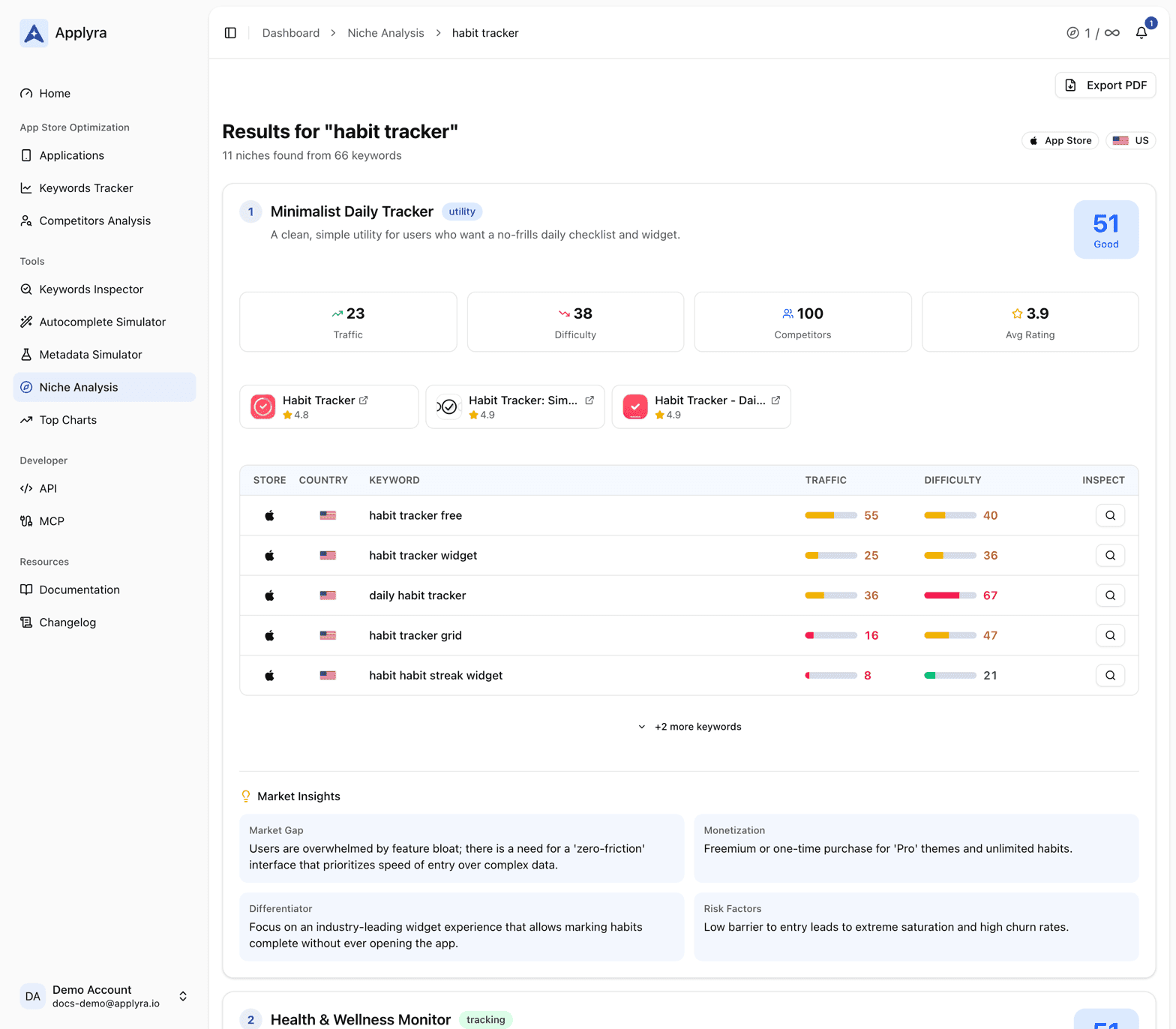
The header tells you how many niches were found and from how many keywords. Each card then carries:
- A name, an app concept and an intent type (utility, content, tracking, social or marketplace), so the niche reads as something you could actually build.
- The opportunity score out of 100, with its label: Excellent from 70, Good from 50, Moderate from 35, Low below that.
- Four numbers: average traffic, average difficulty, competitor count and the average rating of the apps ranking there. A low average rating is the interesting one. It means the users in that niche are not happy with what they have.
- The top 3 apps, linked to their store pages.
- The keyword table: every keyword in the niche with its traffic and difficulty, and a button that opens it in the Keywords Inspector.
- Market insights: market gap, monetization signal, differentiator and risk factors.
What the opportunity score is telling you
One number, out of 100, answering a question you would otherwise answer on instinct: is there room here for an app built by one person. It reads five things at once.
| Signal | What it answers |
|---|---|
| Traffic | Is anybody searching for this |
| Competition | Could a small app realistically rank |
| Market gap | Are the apps at the top actually beatable |
| Dissatisfaction | Are the people using them happy |
| Growth | Are the incumbents still paying attention |
A niche that clears all five is the one to build. A niche that scores well on four and Low on traffic is a hobby. The score is deliberately hard to fool in one direction: no amount of weakness in the incumbents rescues a topic nobody types. The traffic and difficulty inputs are the same ones documented in the traffic score and the difficulty score, and they carry the same bands here as anywhere else: difficulty is Easy up to 33, Medium from 34 to 66 and Hard from 67, and traffic is Low below 25, Medium from 25 to 66 and High from 67.
History and export
Every analysis you run is kept and can be reopened from the history list, so a topic you looked at in March is still there when you come back to it in June, with the numbers it had on the day.
PDF export is on the Unlimited plan. It produces the full report, niche by niche, which is the form you want when the analysis is the thing you are showing someone else.
Limits
| Free | Unlimited | |
|---|---|---|
| Niche analyses per month | 1 | Unlimited |
| PDF export | No | Yes |
The full grid is on pricing, and every plan difference is spelled out in plans and limits.
Turning a niche into a tracked app
An analysis is research, not tracking. When a niche looks right, take its keywords into adding keywords on the app you decide to build or reposition, and the daily ranking data starts from there. If you are not building anything new and only want the opportunities inside the keywords you already follow, that is a different screen: opportunities.
You can also run it from your own tooling. POST /api/v1/niches runs an analysis and
GET /api/v1/niches/history lists the ones you have run. Both are documented in
the API endpoints.
Frequently asked questions
What does Applyra's Niche Analysis do?
You type a topic, a store and a market. It discovers the keywords people actually search around that topic, groups them into sub-niches, and scores each one from 0 to 100 on traffic, competition, market gap, user dissatisfaction and growth. Each niche comes with its keyword table and the apps already ranking.
What is a good opportunity score?
70 and above is Excellent, 50 to 69 is Good, 35 to 49 is Moderate, and below 35 is Low. The score rewards the combination of real search demand and beatable incumbents, so a niche nobody searches never scores well however easy it looks.
How many niche analyses do I get?
One a month on the free plan and unlimited on the $9.99 Unlimited plan. Every analysis you run is kept, so you can reopen it from the history list whenever you come back to the idea.
Last updated on