Competitor analysis: every rival and the visibility gap
Competitors Analysis puts every rival you track next to your own app, with both visibility scores and the gap between them, on one sortable row.
Video transcript
Competitors Analysis puts every rival you track next to your own app, and answers one question: in this market, which of you is being found today? It compares visibility, not ASO Health. You don't control their listing, but you can compare what the store gives each of you. Four tiles sum it up: how many you track, the one gap worth naming, how many rivals you're ahead of, and how many of your apps have one. The gap tile never averages. Behind anyone, it names your worst deficit. Ahead of everyone, your widest lead. Below, one row per pair: your app, the competitor, the market, both visibility scores, and the gap. A positive gap is green, a negative one red. Search, filter by store, app, country or language, and sort any column. Each row opens the head to head for that pair, or stops tracking it. On Unlimited, export sends the filtered rows to a CSV. Read the gap as a standing, not a download forecast: it says whose listing turns up in more of the places that matter. If it widens and you changed nothing, look for a release on their side. Release alerts log the day. If it closes and you shipped nothing, check whether the store recalibrated before you celebrate. The free plan follows one competitor, the one you lose to most. Unlimited covers your whole niche.
Competitors Analysis is the screen where every rival you track sits next to one of your apps, with both visibility scores and the gap between them on the same row. It answers one question: in this market, which of you is being found today. It is on every plan, and the free plan tracks one competitor.
The page is built on the visibility score, not on ASO Health. That is deliberate. ASO Health grades a listing you control, and you do not control theirs. What compares cleanly is the result both of you are getting in the store.
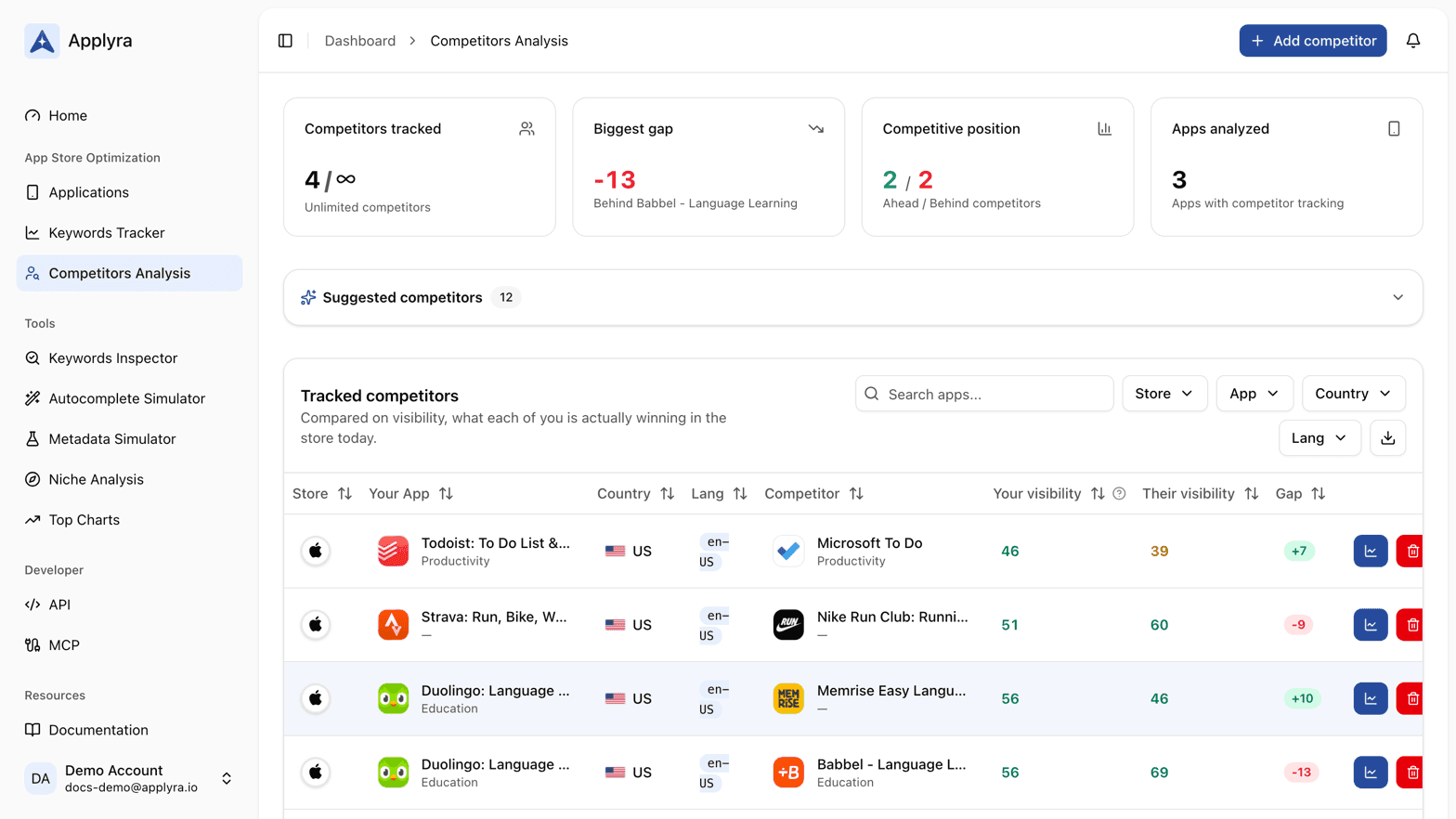
The four numbers at the top
| Tile | What it shows |
|---|---|
| Competitors tracked | How many you follow, against your plan's allowance |
| Biggest gap, or Widest lead | The one comparison worth naming, in visibility points |
| Competitive position | How many competitors you are ahead of, and how many ahead of you |
| Apps analyzed | How many of your apps have at least one competitor attached |
The second tile picks its comparison rather than averaging. If you are behind anyone, it shows your worst deficit and the app causing it, because that is the work. If you are ahead of everyone, it shows your widest lead. An average over a portfolio sitting at -47 and +4 reads "-21", a number that describes neither comparison and points at nothing.
Only comparisons where both sides carry a score are counted, so a market waiting on its first measurement is left out of the tiles instead of being read as a zero.
The tracked competitors table
| Column | What it shows |
|---|---|
| Store | App Store or Google Play |
| Your App | Your app, with its store category underneath |
| Country and Lang | The market the comparison runs in |
| Competitor | The rival app, with its category |
| Your visibility | Your score in that market, on the same 0 to 100 scale |
| Their visibility | Theirs, measured identically |
| Gap | Your score minus theirs |
A positive gap is green, a negative one red, and either side reads "Not measured" until a score exists. You can search by app name, filter by store, by one of your apps, by country and by language, and sort on any column. The paid plan adds a CSV export of whatever the filters currently show, including the gap column.
Each row has a button that opens the full head to head comparison for that pair, and a button that stops tracking the competitor. Removing one is instant and frees the slot.
What the gap actually tells you
The gap is the distance between two visibility scores, so read it as a standing rather than as a download forecast. A gap of -12 does not mean they get twelve percent more downloads. It means that today, their listing is turning up in more of the places that matter than yours.
Two movements are worth opening the comparison for:
- A gap that widens with no change on your side. Usually a release on theirs. The release alerts will have logged the day it happened.
- A gap that closes without you shipping anything. Often a store recalibration rather than a win, which the algorithm change detector will confirm.
How many you can track
The free plan follows one competitor, which is enough to run a genuine comparison against the app you lose to most often. The paid plan lifts the limit so you can cover a whole niche. Current prices and allowances are on plans and limits and on the pricing page.
If the page is empty, start with the suggestions Applyra already computed for your app: see finding the apps you really compete with. If you have never added one, add your first competitor walks through it in a minute.
Frequently asked questions
Where do I see all the competitors I track in one place?
Competitors Analysis lists every rival you track next to the app it belongs to, one sortable row each. The row carries your visibility score, theirs, and the gap between the two, which is your score minus theirs in visibility points, measured the same way in the same market.
How many competitors can I track?
The free plan tracks one competitor, which is enough to run a real comparison against the app you lose to most often. The paid plan removes the limit.
Why does a competitor show Not measured instead of a score?
Applyra scores a competitor as part of adding it, so Not measured means that market carries no score yet rather than a score of zero. The gap column stays empty until both sides carry one.
Last updated on