Check an app's keyword ranking on the App Store and Google Play
Check where any app ranks for a keyword on the App Store or Google Play, in any country, out of the top 100 search results. Free, with no account needed.
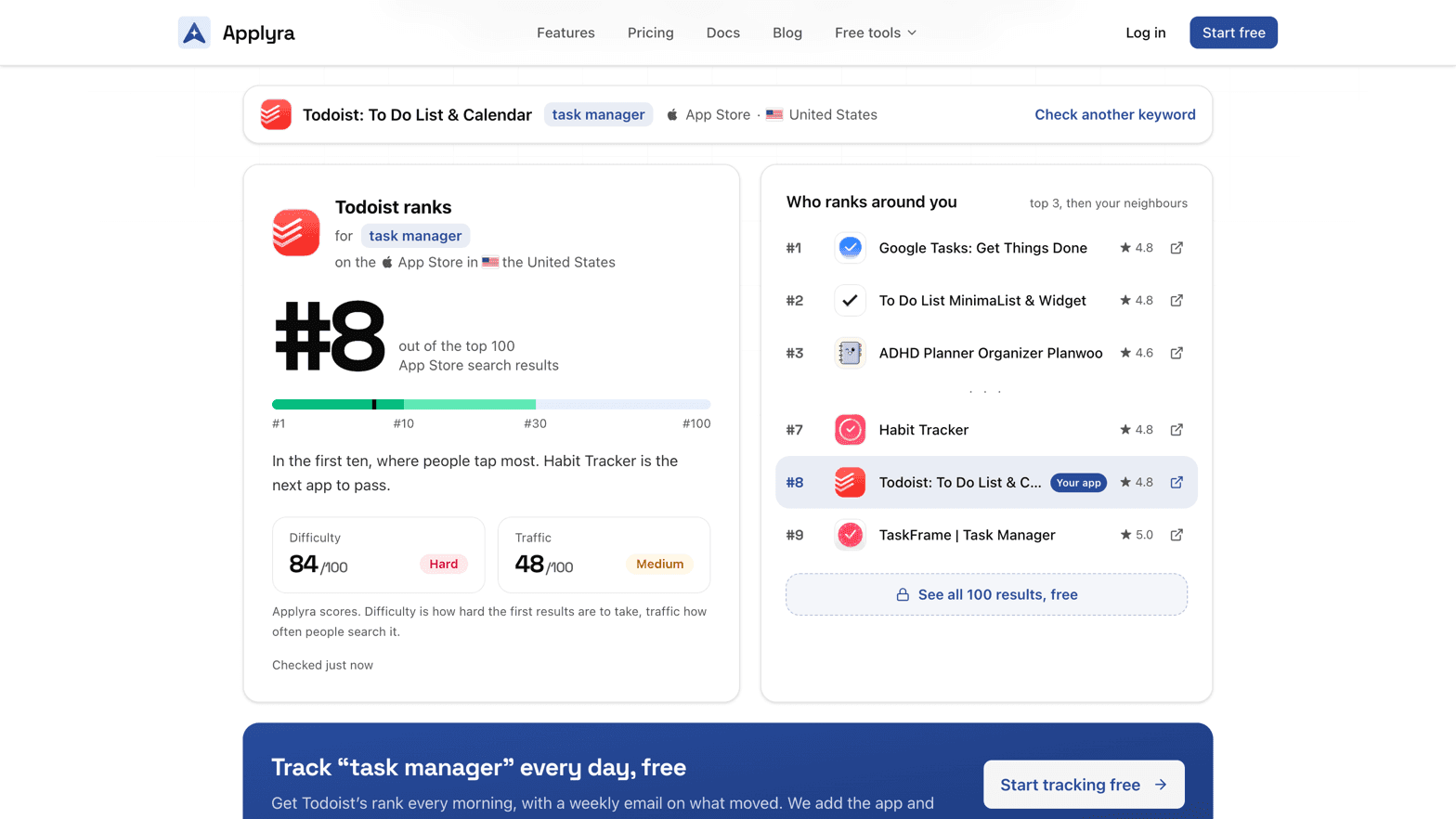
The app rank checker tells you where an app ranks for a keyword on the App Store or Google Play, in one country, out of the top 100 search results. Pick the store and the country, find the app, type the keyword: the position comes back in seconds, with the apps ranked around it. It works for any app, yours or a competitor's, and it is free with no account. It reads the same results Applyra tracks every day, at the same depth.
How to check a keyword ranking
- Pick the store. App Store or Google Play. The two stores rank the same keyword differently.
- Pick the country. 117 App Store storefronts, 118 on Google Play. The checker reads that country's results in its main language, the one the storefront opens in. See markets.
- Find the app. Search it by name (each result shows its developer), or paste its App Store or Google Play link. An app missing from the list is usually not published in that country: see I cannot find my app.
- Type the keyword the way a user types it in the store's search bar, up to 60 characters.
Reading a ranked result
The big number is the position out of the top 100, on a bar marked #1, #10, #30 and #100. One line says what that position means and names the next app to pass, the one ranked right above.
Who ranks around you lists the top three, then the apps just above and below yours, each with its rating and a link to its store page: the fastest way to read the title and subtitle of the app you want to pass. With a free account, the full top 100 opens for every keyword.
Difficulty and traffic sit under the position when Applyra already scores the keyword, each out of 100 with its label. Difficulty is how hard the first results are to take, traffic how often people search the term: see the difficulty score and the traffic score. For a keyword not scored yet, the Keywords Inspector measures both.
| Position | What it tells you to do |
|---|---|
| #1 to #3 | Hold it, and watch the app right below you: it is the one that can take your place |
| #4 to #10 | Open the store page of the next app to pass and compare its title and subtitle with yours |
| #11 to #30 | The apps right above you are your real competition on this term, more than the category leaders |
| #31 to #100 | The store links your app to the search. Push it, or swap it for a longer phrase you can win |
| Not in the top 100 | Start from the longer phrases the checker suggests |
When your app is not in the top 100
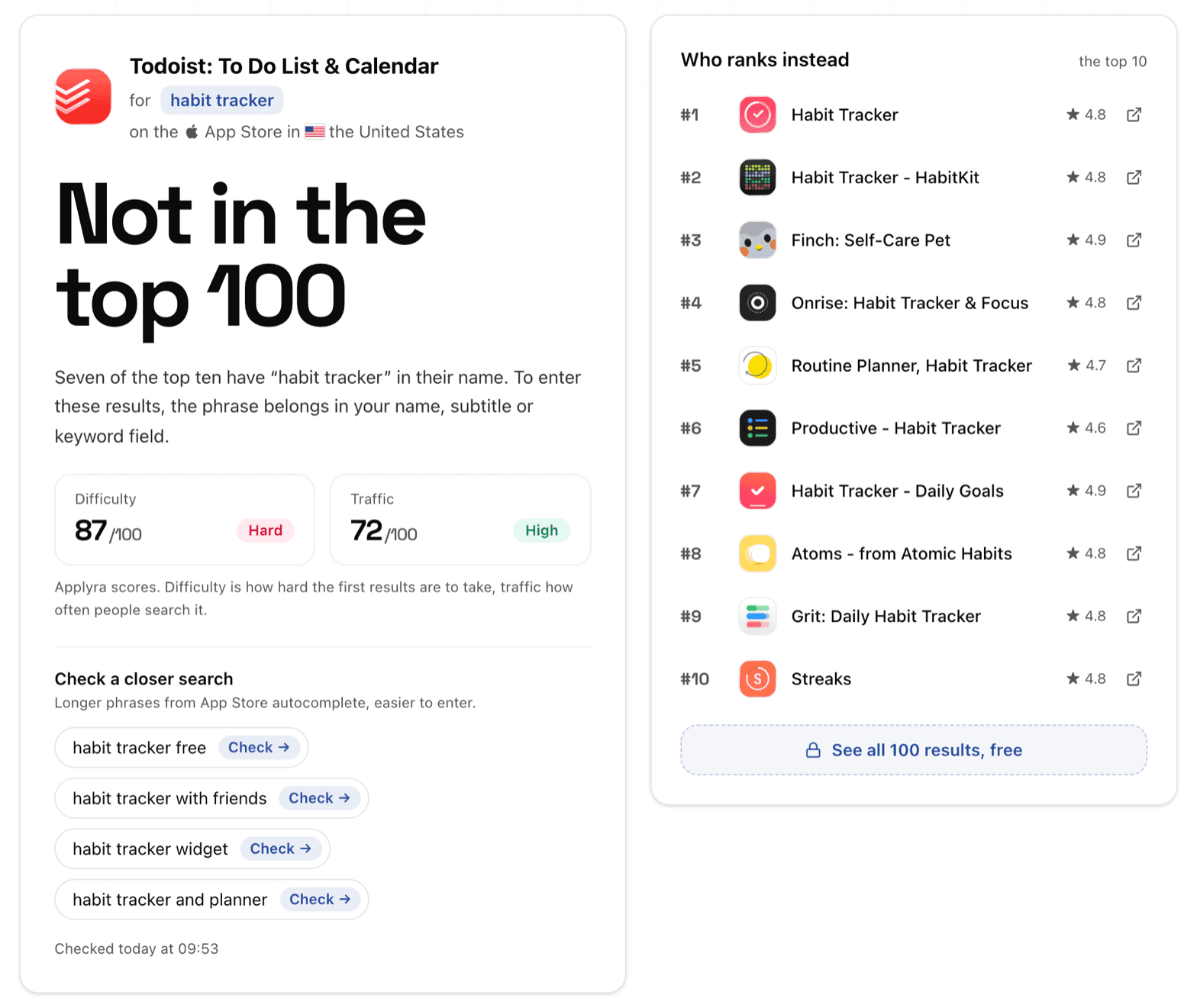
The checker says so and shows who ranks instead, the top ten. It counts how many of them carry the phrase in their name and, when some do, says where it belongs in your listing: the name, subtitle or keyword field on the App Store, the title or short description on Google Play. The fields and their limits are in the metadata fields each store indexes.
Under Check a closer search, it offers longer phrases from the store's own autocomplete, each one a click away from its own check. They are real searches, and a longer phrase is where a smaller app usually enters the results first. To go further, prefix by prefix, use the Autocomplete Simulator.
A missing position is a result, not a failed reading: see why my app is not ranking for a keyword.
Checking a competitor's ranking
Search any app on either store and you get its position for any keyword, in any country, with the same neighbours and scores. Check whether a rival really holds the term before you rewrite your subtitle for it. To see the day it gains or loses a keyword, follow it in your account: finding competitors covers which ones are worth it.
From one check to daily tracking
Three checks a day need no account. A free account keeps you checking, opens the full top 100, and turns any check into daily tracking.
Under every result, Start tracking free carries the app and the keyword into your account. After signup, a page shows both and adds nothing until you confirm. Then Applyra adds the app if you do not follow it yet, adds the keyword, and reads its rank every morning, with a weekly email on what moved. The free plan follows one app and five keywords for as long as you use it: see plans and limits.
The keyword then lives in the Keywords Tracker, and its day-by-day position, with your releases marked, in rank history.
Why your phone can show a different rank
Your own searches run in the storefront and language of your store account, on your device. The checker reads the public results of the country you pick, what someone searching there for the first time gets. Results also move during the day. Both effects are covered in why Applyra shows a different number from the store.
Frequently asked questions
How do I check my app's keyword ranking on the App Store or Google Play?
Open Applyra's free rank checker at applyra.io/tools/app-rank-checker, pick the store and the country, find your app by name or paste its store link, and type the keyword. It returns your position in that country's top 100 search results, with the apps ranked just above and below you.
What should I do when my app is not in the top 100 for a keyword?
Look at the top ten the checker shows and count how many carry the phrase in their name, then check the longer phrases it suggests from the store's autocomplete. A longer, more specific search is where a smaller app usually enters the results first.
What is the difference between checking a rank and tracking it?
A check is one reading of one keyword, for any app, today. Tracking reads the same search results every morning for the keywords you choose, keeps the history next to your releases and emails you what moved. The free Applyra plan tracks one app and five keywords.
Can I check a competitor's keyword ranking?
Yes. The rank checker works for any app on either store, so you can read a competitor's position for any keyword in any country. To follow that competitor every day, add it to your Applyra account.
Last updated on