AI competitor insights: the briefing and its action plan
AI insights turns your measured keyword gaps, score differences and a competitor's recent releases into a verdict, a scorecard and a prioritised action plan.
Video transcript
AI insights is the last tab of the comparison. It's a briefing, not a chat. It works from what Applyra measured: keyword gaps with real positions, the scores behind them, both visibility scores, your ASO Health, ratings, and what each rival shipped. It never takes a competitor's own description as evidence, so no amount of adjectives can talk it into praising them. It opens on a verdict, then a scorecard: discovery, listing, reputation and momentum, each ahead, even or behind. Then the gaps to attack: who leads, their position and yours, why it matters, the field to put it in, and a priority. Your brand terms never show up there: winning them proves nothing. Then come the strengths to defend, and a read on each rival. It ends on an action plan: three to six steps, each with the exact edit, the effort, and the impact. Every placement is a field the store indexes on your platform. On iOS: title, subtitle, keyword field. Never the description. Price words, superlatives, rival names and emoji stay out of any title it writes. A phrase that needs one goes where it still ranks. Before you ship it, score the draft in the Metadata Simulator. Free accounts see a worked example, marked as a preview. The briefing built on your own data is part of Unlimited.
AI insights is the last tab of the comparison, and it is a briefing rather than a chat. It takes the keyword gaps, the score differences and the competitor's recent listing changes that Applyra already measured, and returns a verdict, a scorecard, the gaps worth attacking, the ground worth defending, a read on each competitor, and three to six prioritised next steps.
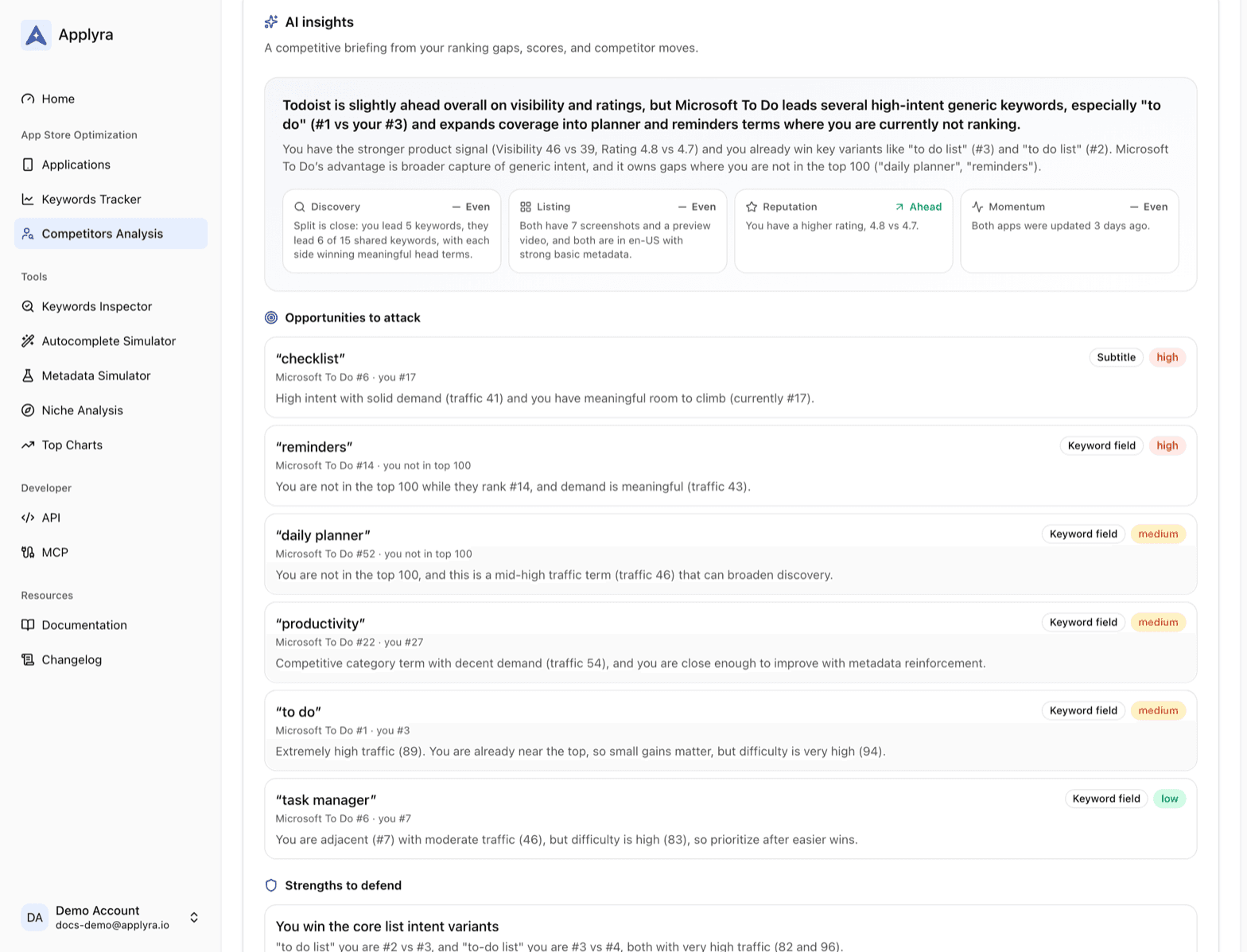
The important part is what it is given. It works from your measured data: the keyword gaps with real positions on both sides, the scores behind those terms, both visibility scores, your ASO Health, ratings, and the listing changes each competitor actually shipped. It never takes a competitor's own description as evidence that they are good, so no amount of adjectives in their listing can talk it into praising them.
What the briefing contains
- A headline and positioning. One line on where you stand against this set, then two or three sentences of context.
- A standings scorecard on four dimensions, each rated ahead, even or behind with a one line reason: discovery (keyword reach), listing (metadata and creative), reputation (ratings) and momentum (how recently each side refreshed their listing).
- Opportunities. The highest impact keyword gaps, each with the competitor who leads it, their position, yours, why it matters, the field to put it in, and a priority. Every one comes from a row where they outrank you. Your own brand terms are excluded, because winning those proves nothing.
- Strengths to defend, drawn from the keywords you already lead.
- Competitor intel, one entry per competitor: a strategic read, the listing changes they actually made, and an optional threat to watch.
- An action plan of three to six concrete steps, each with the exact edit, an effort rating and an impact rating.
Why the placements are trustworthy
Each opportunity names a field, and only fields the store indexes on your platform. On iOS that is the title, the subtitle and the keyword field, never the description, which Apple does not index for ranking. On Google Play it is the title, the short description and the long description. The metadata fields page covers what each one is worth.
The briefing also respects the rules the stores enforce on an app name. Price words, superlatives, competitor brand names and emoji stay out of any title or subtitle it writes, even when the target keyword contains one. In that case the phrase is routed to the keyword field on iOS or the description on Android, where it still ranks, instead of into copy that would be rejected at review. Any store copy it produces is written in your listing's language, not in English.
Before you ship what it proposes, run the draft through the Metadata Simulator. The briefing tells you what to change and the simulator scores the change before it reaches review.
Free and paid
Free accounts see the full briefing format filled with a worked example, clearly marked as a preview, so there is no mystery about what the paid version produces. The generated briefing, built on your apps and your competitors, is part of the paid plan. See plans and limits.
A briefing takes a minute or two to build, and it stays on the page while you work through it. Change the competitor set and Applyra writes you a new one. The numbers in it always match the numbers in the head to head tab, because both read the same measurement on the same day.
Frequently asked questions
What does the AI competitor briefing actually read?
Applyra's briefing reads measured data only: the keyword head to head with real positions, traffic and difficulty scores, both visibility scores, listing metadata, ratings, and the competitor's recent listing changes. It synthesises those numbers rather than summarising anyone's marketing copy.
Is the AI briefing available on the free plan?
Free accounts see a worked example of the briefing so they know exactly what it produces. The generated version, built on your own data, is part of the paid plan.
Can I use the keywords the AI briefing suggests in my app title?
Yes. Applyra's briefing places each keyword in a field the store actually indexes for your platform, and keeps price words, superlatives, competitor names and emoji out of any title or subtitle it writes, because the stores reject those in an app name. A phrase containing one of those goes to a field where it still ranks instead.
Last updated on