How to add your first app to Applyra
Paste a store URL, pick the market you care about, and Applyra starts collecting positions the same day. Your own app or anyone else's, on either store.
Video transcript
Let's add your first app. It takes three steps, and one choice matters more than the others. Open Applications, and click Add your first app. Step one: pick the store, App Store or Google Play. If your app is on both, you add each one separately. Step two: the market, meaning the country and the language you want to follow. This is the choice that matters. Stores rank apps separately in each country and language, so the same app in the United States and in Germany is two apps to track, each with its own keywords, positions and scores. Start with the market that brings in most of your users. You can add the others later. Then search for your app by name. Search only looks in the country you picked. If your app doesn't show up, check the country first, or paste its store link instead. Step three: check it's the right app, then add it to your dashboard. That's it. Its listing, its ASO Health and a first visibility score are there right away. Give it keywords, and its positions start coming in, then every day after that.
Adding an app takes one paste. Go to Applications, choose the store, and give Applyra either the store URL, the bundle identifier, or the app name to search for. Pick the country and language you want to follow, confirm, and tracking starts.
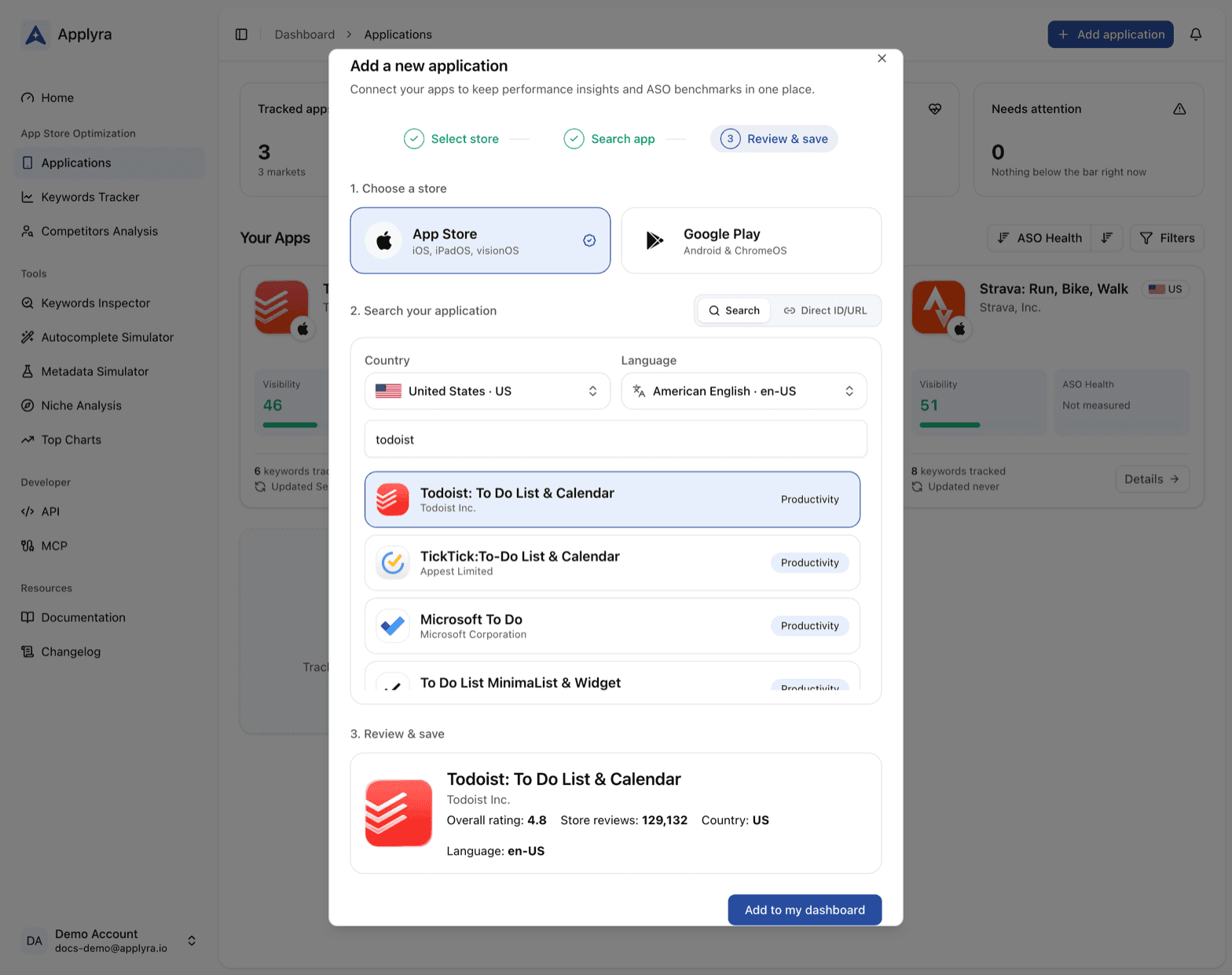
Choosing the right market first
The market is part of the app, not a filter on top of it. An app followed in the United States and the same app followed in Germany are two different things to track, with their own keywords, their own positions and their own scores. That is not an Applyra quirk: the stores themselves rank differently per market, and both split by country and by listing language. See markets for what that means in practice.
So start with the market that pays your bills. You can add the others whenever you want, and each one counts as an app against your plan. When you do, the guide on launching in a new market covers the keyword and localization work that goes with it.
If the search does not turn up your app, it is almost always the storefront rather than the spelling: what to do when an app is not found walks through it.
What happens next
| When | What you get |
|---|---|
| The moment you confirm | The listing as the store returns it: title, subtitle or short description, icon, screenshots, category, rating |
| The moment you confirm | An ASO Health score, which reads the listing and needs nothing else |
| The moment you confirm | A first visibility score, measured on a fixed set of keywords from your niche |
| As soon as you add a keyword | Your position on it, read from the store there and then |
| Every day after | A fresh position on every keyword and a new visibility reading, which you can follow as a trend |
| Each time your live listing changes | A new ASO Health score, for the version the store now shows |
Both scores are there on day one, and they answer different questions. ASO Health grades the part you control, so it is the one to act on first. The visibility score says where you stand today, and it becomes telling once a few days of readings sit side by side.
On the free plan
The free plan follows one app in one market, permanently and without a card. That is enough to learn the tool on the app that matters, and enough to see what the data tells you that you did not already know. When you need a second app, a second market, or more than seven days of history, the paid plan removes the ceiling.
Next
Your app alone measures nothing yet: it needs keywords to be ranked on. Continue with adding your first keywords, then add a competitor to have something to compare against.
Frequently asked questions
How do I add an app to Applyra?
Open the Applications screen, choose the store, then paste the store URL, type the bundle identifier, or search by name. Pick the country and language you want to follow, confirm, and Applyra starts tracking that app in that market.
Can I track an app I do not own?
Yes. Applyra reads public store data, so any app on the App Store or Google Play can be tracked, whether you own it or not. Owning it only matters if you want to supply your iOS keyword field, which Apple hides from everyone.
How long before I see my first rankings?
The listing, the ASO Health score and a first visibility score are there the moment you confirm, and your position on a keyword is read from the store as soon as you add that keyword. From the next day every position and the visibility score are read again each day, which is what turns them into a trend.
How many apps can I track on the Applyra free plan?
One app in one market, permanently and without a credit card. The same app followed in a second country counts as a second app, so the free plan follows one store, one country and one language at a time.
Last updated on