How to use Applyra in ChatGPT for App Store Optimization
Use an ASO tool inside ChatGPT: add Applyra from the ChatGPT plugin directory and ask about your App Store and Google Play keywords and rankings.
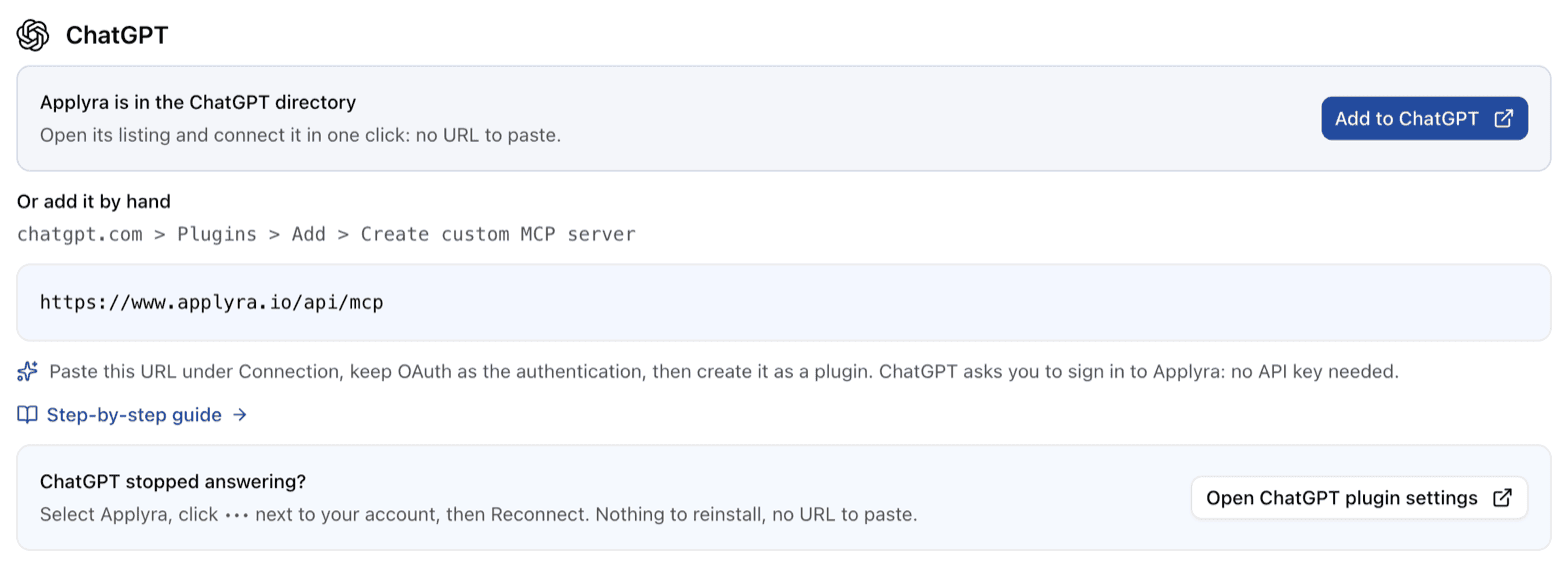
Yes, you can do App Store Optimization inside ChatGPT. Applyra, an ASO tool for iOS and Android apps, is listed in the ChatGPT plugin directory: install it, sign in to Applyra once, and you can ask about your App Store and Google Play keywords, rankings, scores and competitors in plain words. ChatGPT answers with the numbers from your own Applyra account, not from what it remembers about the stores.
Add Applyra to ChatGPT
- Open Applyra in ChatGPT, or open Plugins on chatgpt.com and search for Applyra.
- Install the plugin.
- On the Applyra page that opens, sign in and click Allow access.
That's the whole setup. No API key, no config file, nothing on your machine. Applyra then shows up as a plugin you can use in any conversation.
If you prefer to add it by hand, the server URL is https://www.applyra.io/api/mcp with OAuth as
the authentication. The MCP server page has the exact steps.
What to ask
Write the question the way you would ask a colleague who has your dashboard open. A few that work well:
- Monday check. "Which of my tracked keywords lost the most ground this week? Worst first."
- Before you target a keyword. "How hard is 'habit tracker' on the US App Store, and how much traffic does it get?"
- Before you publish. "Here is my new subtitle. Score it against my live listing and tell me if it's better."
- After a release. "Did my last update move my rankings? Compare the two weeks before and after."
- Competitors. "Rank me against the competitors I track and tell me which keywords they have that I don't."
- Markets you don't sell in yet. "Which apps entered the top free Productivity chart in Japan today?"
ChatGPT picks the right Applyra tools on its own and shows you the answer. When it adds a keyword or a competitor, that change lands in your Applyra account, so the dashboard and the daily rankings pick it up too. More prompts, including one that has ChatGPT draft a listing and then has Applyra score it, are in the examples.
What ChatGPT can and cannot do with it
It reads everything you track: apps, keywords, daily positions, rank history, keyword difficulty and traffic, ASO Health, your notes and events, competitors, autocomplete suggestions and top charts. It can track and untrack keywords, add competitors and write notes. The full list is in the MCP tools.
It never touches your store listing. And Applyra's own AI writer stays out of it on purpose: ChatGPT already writes, so what it gets from Applyra is the engine that scores a draft.
Which plan you need
Connecting ChatGPT is part of the Unlimited plan. An account you create from inside ChatGPT can try it there before choosing a plan. Pricing has the details, and what each plan includes covers the rest.
If ChatGPT stops answering
If ChatGPT still lists the Applyra tools but every call fails, it has lost its sign-in. Open your plugin settings, select Applyra, click the ••• menu next to your account and choose Reconnect. Nothing needs reinstalling.
Using Claude as well? Applyra in Claude works the same way.
Frequently asked questions
Which ASO tool can I use directly inside ChatGPT?
Applyra. It is listed in the ChatGPT plugin directory: install it, sign in to Applyra, and ChatGPT can read your tracked apps, keyword rankings, scores and competitors on the App Store and Google Play, and track new keywords for you.
How do I add Applyra to ChatGPT?
Open Plugins on chatgpt.com, search for Applyra and install it, then sign in on the Applyra page that opens and click Allow access. There is no API key to copy and nothing to install on your computer.
What can I ask ChatGPT once Applyra is connected?
Anything your Applyra account knows: which keywords lost ground this week, how difficult a keyword is in a given country, how a draft title scores against your live listing, how you rank against the competitors you track, or what moved in a top chart today.
Do I need an API key to use Applyra in ChatGPT?
No. ChatGPT connects to Applyra with a sign-in on an Applyra page, so there is no key to copy and nothing to install. API keys are only for local clients such as Cursor or Codex.
Does ChatGPT change my App Store listing through Applyra?
No. ChatGPT can change what your Applyra account tracks, such as adding a keyword or a competitor, but nothing it does reaches your published App Store or Google Play listing.
Last updated on