What ChatGPT and Gemini actually answer about your app
The Answers tab keeps every answer ChatGPT and Gemini gave to your prompts, word for word, with the apps named in order, the pages cited and ChatGPT's searches.
Video transcript
What does ChatGPT actually say when your users ask? Every answer is in the Answers tab. Each row shows the question, the engine, the market, and the apps it named, in order. Open one for the full answer, the pages it cited, and what it searched the web for. An answer in another language translates in one click. The Sentiment tab sums up the tone of every answer about you, and the drawbacks they repeat, quoted word for word. Pick a competitor to read what AI says about them too.
The Answers tab is the evidence behind every figure: each answer ChatGPT and Gemini gave to your prompts, word for word, newest first. Each row shows the apps the answer named in the order it named them, whether yours is among them and in what position, and opens into the full text with the pages it cites and, for ChatGPT, what it searched for. When a number on another tab surprises you, this is where you find out why.
What each row shows
| Part of the row | What it tells you |
|---|---|
| Engine and flag | Which engine answered, and in which market |
| The prompt | The question that was asked, in its market's language |
| App chips | Every tracked app the answer names, numbered in the order it names them, yours highlighted. An app the question already names shows unnumbered |
| web or memory | Whether ChatGPT ran a web search for this answer or answered from what it already knew |
| positive, neutral or negative | How the answer presents your app, or the app picked in App |
| cited or listed | Your store listing or site is in the sources: cited when the answer draws on it, listed when it is among the sources but the answer does not draw on it |
| Outcome | A check with your position, a cross when your app is not named, In the prompt when the question already names your app, or Declined |
| Date | The day of the answer |
The number in the outcome badge is your position in that answer, the one the Mentions tab averages into your position.
Filters
The period, engine and market work as on every tab, and they arrive set when you come from another one. On top of them:
- Search prompts finds the answers to the prompts containing a word.
- Category keeps one kind of prompt, such as Comparing apps.
- App keeps the answers that name one app, yours or a competitor.
- Outcome: the answers that name your app, the ones that do not, or the ones that cite your store listing or site.
- Search mode: Searched the web or Answered from memory, on ChatGPT's answers.
- Tone about your app, or about the app picked in App: positive, neutral or negative.
- A prompt chip: arriving from a prompt, a figure or a quote adds a chip with that prompt. Its cross removes it.
Two combinations earn a bookmark. App set to a competitor with Outcome set to Does not name your app gives you the answers that name them and leave you out. Tone about your app set to negative gives you every answer that criticises you, in one list.
Inside an answer: sources, searches and follow-ups
Click a row and it opens in place.
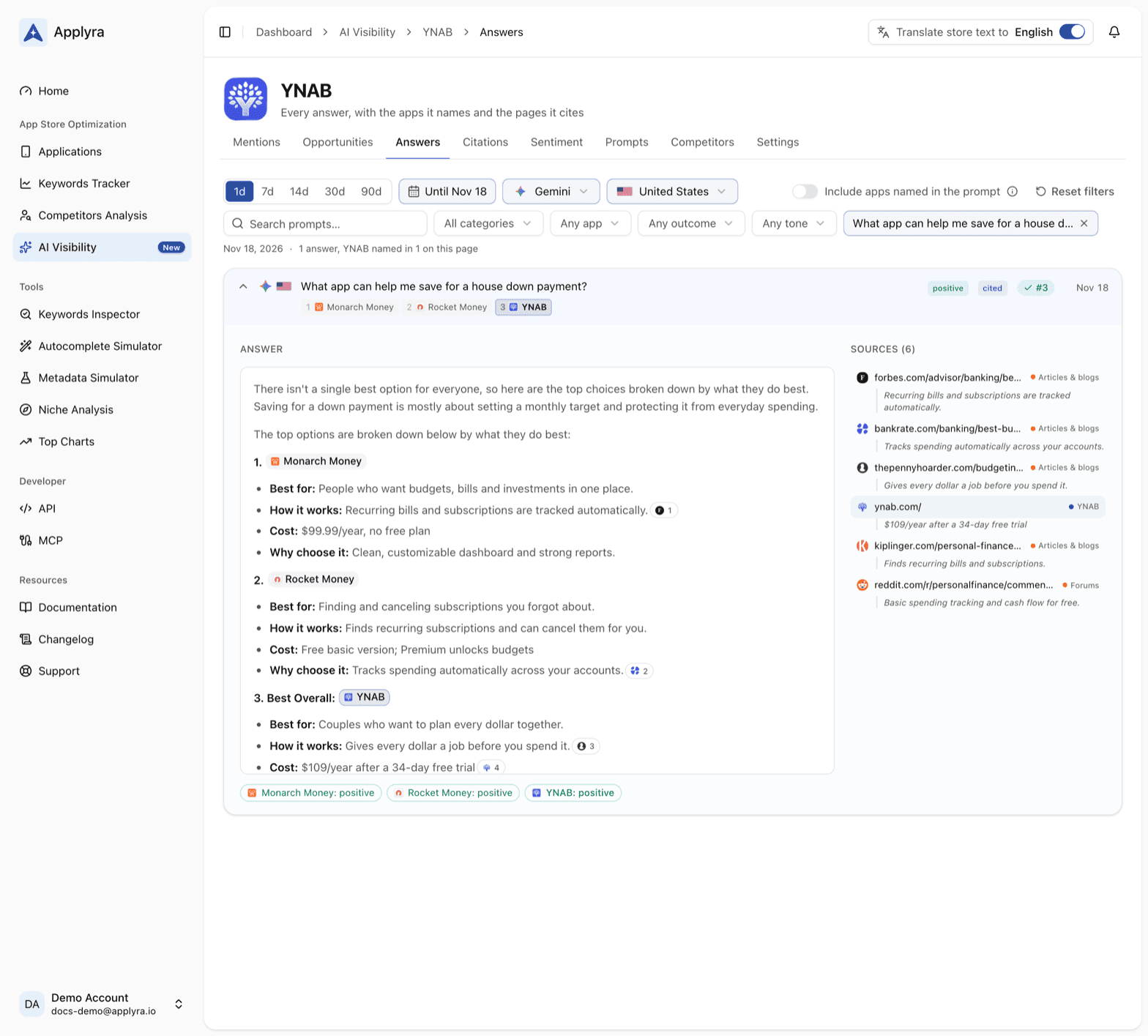
- Answer: the full text, as the engine wrote it, with every tracked app highlighted where it is named, and small chips that link the page backing each line. Under it, a chip per app with the tone the answer takes toward it.
- Sources: every page the answer cites, with its kind (Articles & blogs, Review sites, Forums, Social, Store listings, Websites, a competitor's page, or yours) and the passage the engine took from it. A store listing of an app you do not track yet ends on a Track button: it becomes a competitor on both stores, with every past answer that named it.
- Searched for: the words ChatGPT typed into its web search to build the answer, its fan-out queries. They are the queries a page has to win to be cited, and how people put what your app does.
- Follow-ups the engine suggests: when the engine proposes next questions, they are listed here, a ready list of prompts worth tracking.
The searches and the pages cited across all your answers are gathered on the Citations and Opportunities tabs. The single answer is where you read them in context.
Answers in another language
An answer from France is in French, because the prompt was asked in French. With translations on, an answer in a language other than yours opens with a switch above it: Original, and your language. One click reads it in yours, another goes back to the words the engine actually wrote.
Answers an engine declines
Sometimes an engine refuses to answer. The row then reads Declined, and it never counts against your app. Opened, it says which engine refused and points you to the Prompts tab: engines refuse some topics, such as betting, and a reworded prompt may get an answer.
Read the answers from your own tools
GET /ai-visibility/apps/{id}/answers lists the answers with the same filters, and
GET /ai-visibility/apps/{id}/answers/{answer_id} returns one in full, its text, apps, pages and
searches included: see the API endpoints. In ChatGPT or Claude,
list_ai_answers and get_ai_answer in the MCP tools let you ask for
"the answers this week that recommend a competitor and leave my app out" and read them in the
chat.
Frequently asked questions
Can I see exactly what ChatGPT says about my app?
Yes. Applyra's Answers tab keeps every answer ChatGPT and Gemini gave to your prompts, word for word, with the apps it names in order, the tone toward each one and the pages it cites.
Does ChatGPT search the web before it recommends an app?
Sometimes. When it does, Applyra's Answers tab lists the searches it ran beside the answer, and the Search mode filter separates the answers it gave after searching the web from the ones it gave from memory.
Can I read an AI answer written in another language?
Yes. With Applyra's translations on, an answer in another language opens with an Original and a your-language switch, so it reads in your language in one click and goes back to the original in another.
Why does an AI answer say Declined?
The engine refused to answer that prompt, so the answer never counts against your app in Applyra. Engines refuse some topics, such as betting, and a reworded prompt may get an answer.
Last updated on