How to improve your app's AI visibility, 15 minutes a week
A 15-minute weekly pass through AI Visibility: read what moved, open the answers behind it, work one opportunity, check the tone, then tune your prompts.
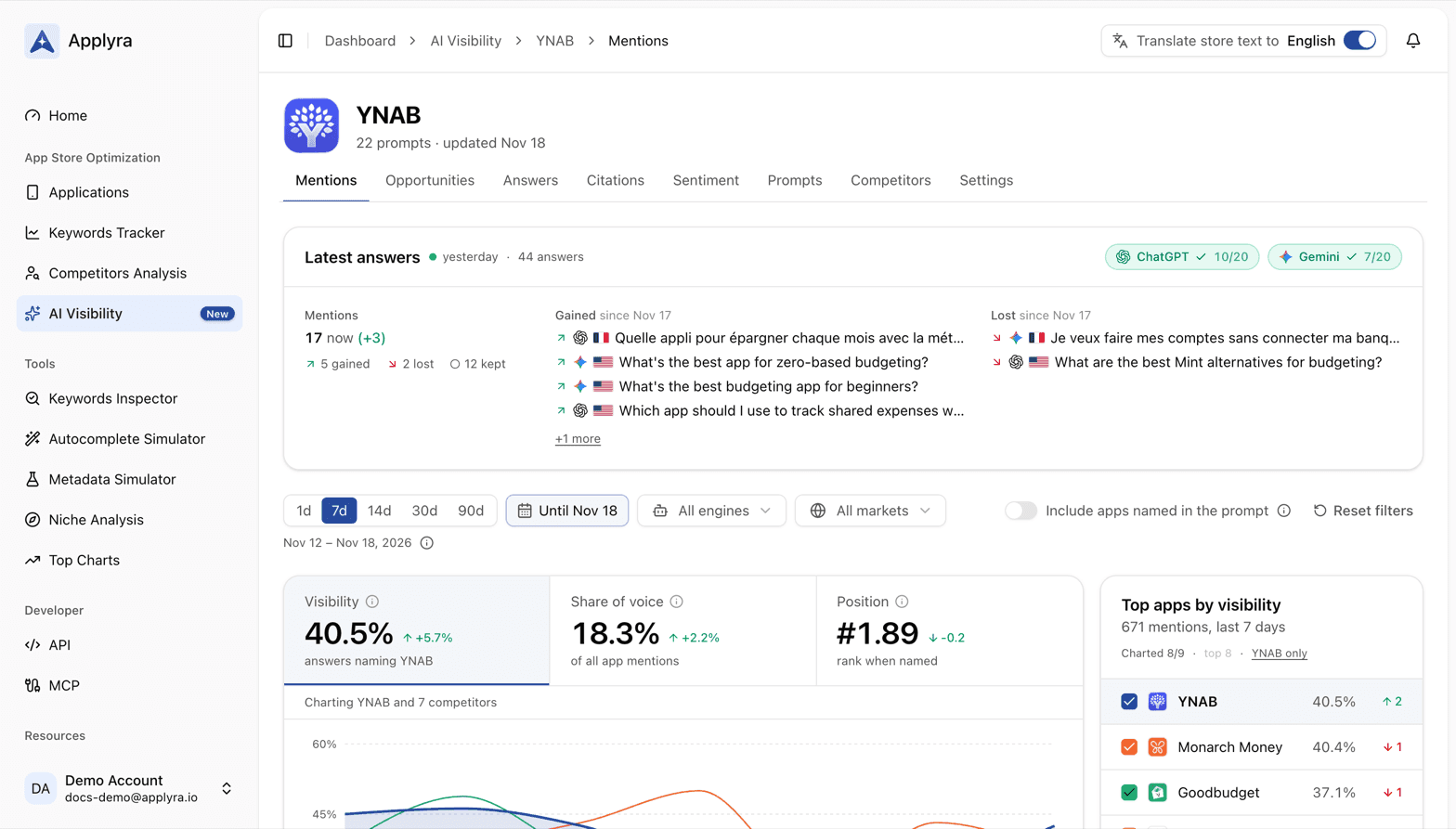
To improve your app's AI visibility, run this weekly pass through AI Visibility: fifteen minutes, one app, ending with one thing done that can get your app named in ChatGPT and Gemini. Run it on the same day each week, so every reading compares a full week with the one before.
It needs an app set up in AI Visibility with a week of answers behind it. If you are not there yet, start with how to track if ChatGPT and Gemini recommend your app.
The routine, block by block, with its budget:
- Read what moved (3 minutes).
- Open the answers behind it (3 minutes).
- Work one opportunity (5 minutes).
- Read the tone (2 minutes).
- Tune the prompts and competitors (2 minutes).
1. Read what moved (3 minutes)
Open the app in AI Visibility on the Mentions tab and set the period to 7d. Every tab you open next keeps it.
Start with Latest answers, at the top. It lists the prompts gained and lost with the latest answers, each with its engine and market. A lost prompt is the first thing worth a click this week. Then read the three tiles under the filters, each with its change against the week before:
- Visibility up or down tells you whether you are in more answers or fewer.
- Share of voice down while visibility holds means your competitors are being named more around you.
- Position rising as a number means you are named lower in the lists.
Glance at Top apps by visibility for the arrows: a competitor that climbed two places in a week is worth a look, and its answers will tell you what changed. Then Mention rate by engine: a widening gap between ChatGPT and Gemini points you at the engine to work on.
What good looks like: visibility flat or rising, nothing in Lost that you cannot explain. How visible is your app in ChatGPT and Gemini? explains each figure.
2. Open the answers behind it (3 minutes)
Click the prompt that moved most, a lost one if there is one. It opens the Answers tab on exactly the answers behind it. Open the answer and read three things:
- Who is named, and in what order. The app chips at the top of the row tell you who took your place.
- What it leans on. The Sources on the right, with the passage taken from each page.
- What ChatGPT searched. Searched for shows the words it typed before answering.
Do not try to explain every movement: one answer read properly tells you more than ten skimmed.
What good looks like: you can say in one sentence why the prompt moved. "A roundup it cites was updated and dropped us" is a sentence you can act on.
3. Work one opportunity (5 minutes)
Open Opportunities. To do this period has already picked the first move of each kind:
- Prompts within reach: the prompt you are closest to winning, with the pages to get on to be named there.
- Pages to get on: the page cited most often in answers that leave your app out, with the move, such as ask the author to add your app or reply in the thread as its maker.
- Keywords ChatGPT searched: the first keyword to track in the stores.
Pick one and do it now, while the page is open. Draft the email to the author, write the forum reply, or press Track App Store ranking on a searched keyword so it joins your Keywords Tracker. Five minutes is enough to start any of them, and starting is the part that slips.
Then look for Won since the period before under the tiles. A prompt there was within reach a week ago and now names your app near the top on every engine: the evidence that the work pays. How to get your app recommended by AI details each list.
What good looks like: one move made, written down so you know what to look for in a few weeks. A note on the app in Applyra works well: see notes and events.
4. Read the tone (2 minutes)
Open Sentiment. Read the Net sentiment and its line in Over time, then the first lines of What AI holds against your app. A drawback climbing the list, or a new one, is worth knowing before your reviews tell you. Glance at Against competitors: a competitor whose tone dropped is being warned about for something, and the drawback under its name says what.
What good looks like: no new drawback, and the main one either shrinking or already on your list of things to fix at the source. How ChatGPT describes your app explains the cards.
5. Tune the prompts and competitors (2 minutes)
Two small edits keep the measurement honest:
- Prompts. If the answer you read in block 2 lists Follow-ups the engine suggests and one of them is a question your users really ask, add it on the Prompts tab, in its market. If a prompt has been declined every day, reword it as a new prompt and pause the old one.
- Competitors. On the Competitors tab, Suggested competitors lists the apps ChatGPT recommends by name and the store pages the answers link to, among the apps you do not track. Add the ones that keep coming back.
What good looks like: your prompts still read like your users, and the apps that keep taking your place are on your leaderboard.
Once a month, zoom out
Every fourth week, run block 1 on 30d instead, then 90d. Answers move slowly: the blog guide on getting recommended by ChatGPT plans on 4 to 8 weeks before a new positioning shows. A month is where your moves start to show as a trend, and where it is worth checking one market at a time with the market filter. Pair it with the monthly ASO routine on the store side.
Let an assistant do the reading
If you live in ChatGPT or Claude, the MCP server gives it the same data:
get_ai_visibility for block 1, list_ai_answers for block 2, get_ai_opportunities for block
3 and get_ai_sentiment for block 4, all described in the MCP tools.
Ask it "what changed in my AI visibility this week, and what is the one page I should get on?",
and keep the five minutes of block 3 for yourself.
Frequently asked questions
How often should I check my app's AI visibility?
Once a week. Answers move every day, and a week of them in Applyra AI Visibility tells a trend from one day's noise, while leaving the pages and keywords you worked on the time to show up.
What should I do every week to get my app recommended by ChatGPT?
In Applyra AI Visibility, read what moved on the Mentions tab, open the answers behind the biggest change, and work one opportunity such as a page to get on or a keyword to track. Then check what the answers hold against you and tune your prompts and competitors.
How long does it take for AI recommendations to change?
Longer than a store ranking. Plan on several weeks before a page you got onto or a clearer positioning shows in ChatGPT and Gemini answers, which is why the Applyra routine works one opportunity a week and reads the trend rather than the day.
Last updated on