Which AI prompts should you track for your app?
A prompt is one question in one market, asked to ChatGPT and Gemini every day. The five kinds to track for an app, with examples, and how to write good ones.
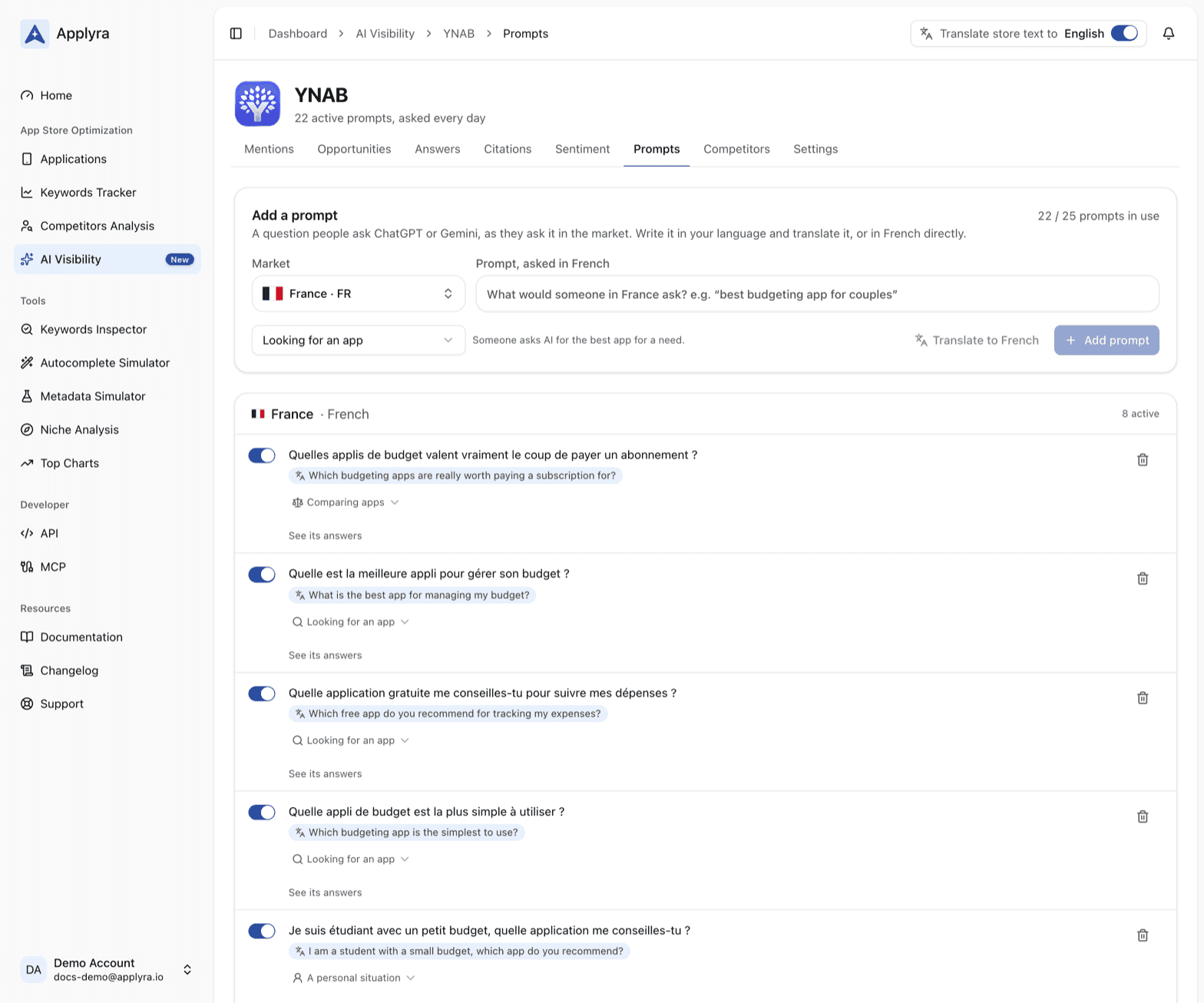
A prompt is one question in one market, written the way people there ask it: "best budgeting app for couples" in the United States, "meilleure appli de budget" ("best budgeting app") in France. AI Visibility asks every active prompt to ChatGPT and Gemini every day, and every figure on the other tabs is read from those answers. Your prompts decide what your visibility means, so they are worth ten minutes of thought.
The five kinds of prompt
Each prompt has a kind, named the way the person asking would describe what they are doing:
| Kind | The person asking | Example |
|---|---|---|
| Looking for an app | Asks AI for the best app for a need | "best budgeting app for couples" |
| Comparing apps | Weighs your competitors, or wants an alternative to one | "an alternative to [competitor] that works offline" |
| Getting something done | Wants a job done that your app does | "how do I split rent with my roommates?" |
| A personal situation | Describes their context and limits: free, offline, for kids | "budgeting app for a student, free, no bank login" |
| About your app | Asks about your app by name | "Is [your app] worth it?" |
The first four tell you whether AI recommends your app when someone is choosing. About your app tells you something else: whether ChatGPT and Gemini know your app, and what they say about it. Its answers live on the Sentiment tab, in the card When asked about your app's name.
The kind is set from a menu on every prompt and can change at any time. It also filters the Answers tab, so you can read only the comparison questions, for instance.
How to choose the prompts to track
The test of a prompt is simple: would a real user of your app type it?
- Write the user's question, not your tagline. "app to split rent with roommates" is a question. "best collaborative finance platform" is a pitch nobody types.
- Spread across the kinds. A market read only on "best X app" misses the comparison and the situation questions, which are often where a focused app gets named.
- Use your keywords. The prompts Applyra writes from a keyword you track carry From your keyword, so what you rank for in the store is checked in AI answers too. Your Keywords Tracker is a good list of what people call your category.
- Name the competitor people leave. "an alternative to X that works offline" is where users on their way out of a competitor ask, and a Comparing apps prompt catches them.
- Keep a couple About your app. "Is X worth it?" tells you whether AI knows your app at all, and what it repeats about it.
If an engine declines a prompt (it happens on topics such as betting), reword it as a new prompt and pause the old one. How the questions group into clusters worth covering is in how to get your app recommended by ChatGPT.
Add a prompt in any market
Every prompt belongs to one market and is asked in its language, across 85 markets in 36 languages. On the Add a prompt card:
- Pick the Market.
- Type the question, in that market's language or in yours.
- If you wrote it in yours, press Translate to: Applyra rewrites it the way people there ask.
Prompts are grouped by market. With translations on, each one shows its translation underneath, so a list in Japanese reads in your language.
Pause, resume or delete a prompt
The switch in front of each prompt pauses it or resumes it:
- Paused: it is no longer asked, and its history stays.
- Resumed or added: it is asked that same day, and a new prompt starts its history the day you add it.
- Deleted: its answers and their history go with it. Pause it instead if you may want them.
A tracked prompt keeps its words, so its history always reads one question. To reword one, add the new version and pause the old one. See its answers, under each prompt, opens the Answers tab on that prompt alone.
Your plan sets how many are active
Your plan sets how many prompts are active at once: 25, 75 or 200. They are one pool across all your apps and markets. The prompts in use counter on this tab, like Active prompts on the AI Visibility screen, shows where you stand. When every prompt is in use, pause one to add another, or move to a larger plan from the plan menu on the AI Visibility screen.
Change size whenever you like: every prompt and its history stay in your account. A prompt waiting for room reads Paused when your plan changed: resume it when you have room. The sizes are in plans and limits.
Read your prompts from your own tools
Your prompts, with how their answers treat your app over a period, are one call away from a
script or an assistant: GET /ai-visibility/apps/{id}/prompts in the
API endpoints, list_ai_prompts in the MCP tools.
Once yours are in place, the Mentions tab turns them into
figures.
Frequently asked questions
What is a prompt in AI Visibility?
One question in one market, written the way people there ask it, such as "best budgeting app for couples" in the United States. Applyra asks each active prompt to ChatGPT and Gemini every day, and every figure of AI Visibility is read from their answers.
What makes a good prompt to track in ChatGPT?
The question a real user types, in their words and their language, about a need your app answers. In Applyra, spread your prompts across the kinds of question, from looking for an app to comparing two of them, rather than repeating one "best app" question.
Are AI Visibility prompts shared between my apps?
Yes. Your plan's prompts are one pool for all your apps and markets in Applyra, so you can put most of them on the app and market that matter most to you.
What happens when I pause a prompt in AI Visibility?
A paused prompt stops being asked and keeps its history, and it is asked again the same day you resume it. Deleting a prompt removes its answers and their history, so pause it if you want to keep them.
Last updated on