How does ChatGPT describe your app? Tone and drawbacks
The Sentiment tab reads the tone of every AI answer that names your app or a competitor, and quotes the drawbacks ChatGPT and Gemini hold against each one.
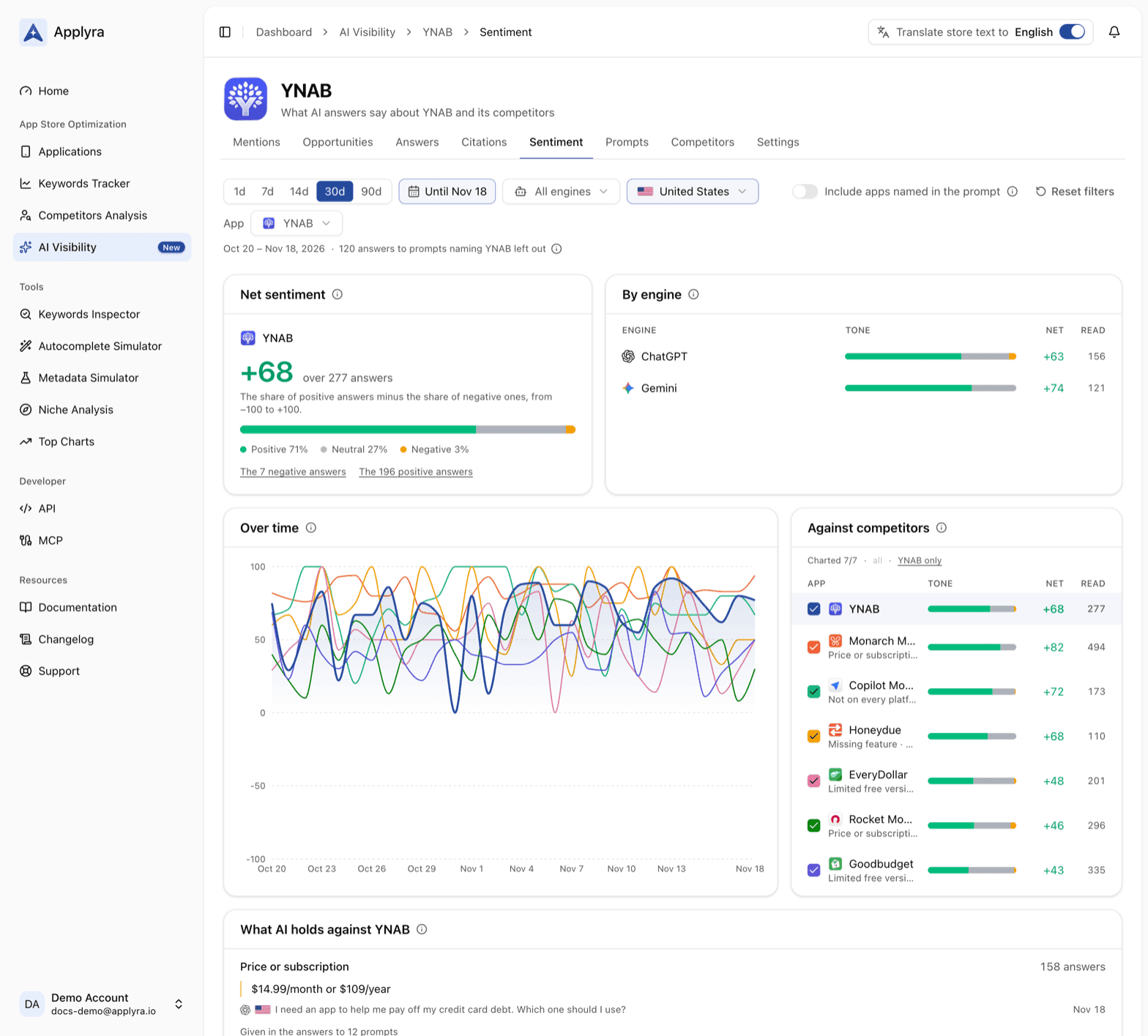
The Sentiment tab shows how ChatGPT and Gemini describe your app when they name it: positive, neutral or negative, and with which drawbacks. It sums the tone up into a net sentiment for your app and each competitor, and quotes, word for word, what the answers hold against you.
Net sentiment
The first card gives the app's net sentiment, one figure for how warmly the answers present it, from -100 when every answer is negative to +100 when every answer is positive. Under it, the split between Positive, Neutral and Negative, and two links, to the negative answers and to the positive ones, each opening the Answers tab on exactly those.
The three tones mean what they say. A positive answer recommends the app. A neutral one lists it without taking sides. A negative one criticises it or steers people away. Neutral is not a failure: being in the list is what visibility measures, and tone tells you how warmly.
By engine, beside it, gives the same tone for ChatGPT and for Gemini, harshest first. Each line opens that engine's answers, every one with its tone.
Over time and against competitors
Over time draws each app's net sentiment day by day. Against competitors, beside it, is its legend: every tracked app with its tone and its net sentiment, and under each competitor's name the drawbacks the answers give it most. Tick an app to draw its line. Click a competitor's name and the whole tab switches to it.
A competitor whose tone drops while yours holds is an opening. The answers that criticise them, read from their side of the tab, tell you what their users are being warned about, and whether your app answers it.
What AI holds against your app
What AI holds against your app lists the drawbacks the answers give it, most frequent first, each with how many answers give it:
- Price or subscription
- Ads
- Limited free version
- Bugs or slowness
- Privacy
- Complexity
- Missing feature
- Not on every platform
Under each drawback, the words of one answer that says it, and the prompts it comes up in, each one opening its answers. This is the card worth reading slowly. A drawback that repeats is what the engines believe about your app, and somebody wrote it first: an old review, a forum thread, a pricing page that has changed since. The Citations tab shows which pages those answers lean on.
Does ChatGPT know your app?
The prompts that ask about your app by name, the way a user checks an app before downloading it, get a card of their own, When asked about your app, engine by engine:
- Knows it: the answer talks about your app.
- Not as an app: the answer uses your app's name for something else.
- Does not name it: the engine does not know your app yet.
- Declined: the engine refused to answer.
With it, the tone when the engine knows your app, what it holds against it, and the newest answer to each prompt, quoted. If you track no such prompt yet, the card offers to add some. An engine that does not know your app is the clearest sign that your app is missing from what it reads.
By prompt, criticised and praised
By prompt lists the questions whose answers present your app worst first, so you know which conversations to fix. Criticised and Praised quote the newest answers that present your app badly or recommend it, with the passages that name it. Each one opens the whole answer on the Answers tab.
Reading a competitor's tone
The App menu, next to the filters, reads any competitor you follow instead of your app. Every card follows: net sentiment, engines, drawbacks, the prompts that present it worst, the passages that criticise or praise it. Pick one market in the filters and the menu lists the competitors you follow there.
The period, engine and market filters work as on the Mentions tab.
How to change what AI says about your app
Fix a drawback where it is written. If the answers keep saying your app is expensive, find where they read it and give that page something better to quote: a clear free tier on your site, a current price on a roundup that has an old one. Then follow the drawback's count over the next weeks. Opportunities lists the pages to get on, and how to get your app recommended by ChatGPT covers positioning across the web.
The same figures, drawbacks and quotes included, come back from
GET /ai-visibility/apps/{id}/sentiment in the API endpoints and from
get_ai_sentiment in the MCP tools.
Frequently asked questions
What is net sentiment in AI Visibility?
Net sentiment is Applyra's one-figure summary of how ChatGPT and Gemini present an app, from -100 when every answer is negative to +100 when every answer is positive. A positive answer recommends the app, a neutral one lists it without taking sides, and a negative one criticises it.
What drawbacks can ChatGPT and Gemini hold against an app?
Applyra groups them into price or subscription, ads, a limited free version, bugs or slowness, privacy, complexity, a missing feature, and not being on every platform. Each drawback comes with the words of an answer that says it and the prompts it comes up in.
How do I know if ChatGPT knows my app?
Track a few prompts that ask about your app by name, filed under About your app. Applyra's Sentiment tab then shows, for each engine, how many answers know your app, how many use its name for something else, and how many do not name it at all.
Can I see what AI says about my competitors?
Yes. Pick a competitor in the App menu of the Sentiment tab and the whole tab reads it: its net sentiment, its tone per engine and over time, the drawbacks the answers give it, and the passages that criticise or praise it.
Last updated on