How to get your app recommended by AI
The Opportunities tab lists the prompts your app is closest to winning, the pages to get on and the words ChatGPT searched, each with the move to get named.
Video transcript
Knowing where you stand is half the job. Opportunities tells you what to do next. Within reach lists the prompts where one engine names you and the other doesn't. They're the closest to win. Pages to get on are the articles AI cites while it recommends your competitors. Being on them is how an engine finds you next time. What ChatGPT searched for shows the words your users would type in the stores. Track them in one click. Come back every week. Won prompts show what your work paid off.
To get your app recommended by AI, work the three things the Opportunities tab lists for your own prompts: the prompts you are closest to winning, the pages ChatGPT and Gemini cite in answers that leave your app out, and the words ChatGPT searched for to answer your users. Each comes with the move that gets your app named: the page to get on, the author to ask, the keyword to track in the stores. Start at To do this period, which picks the first one of each for you.
Why this works for a focused indie app is in how to get your app recommended by ChatGPT. This page is the practice, on your data.
To do this period
The card at the top counts each kind of opportunity in the period, against the period before:
| Tile | What it counts | First move it suggests |
|---|---|---|
| Prompts within reach | Prompts you are close to winning | Get named by the engine that leaves you out, for that prompt |
| Pages to get on | Pages cited in answers that leave your app out | The move for the most cited one, such as Ask the author to add your app |
| Keywords ChatGPT searched | The words ChatGPT typed into its web search | Track your ranking for the first one, or check it if you already track it |
Next to each count, how many are new this period and how many there were before. When prompts went your way, a line underneath says Won since the period before: the prompts that were within reach and now name your app on every engine, near the top.
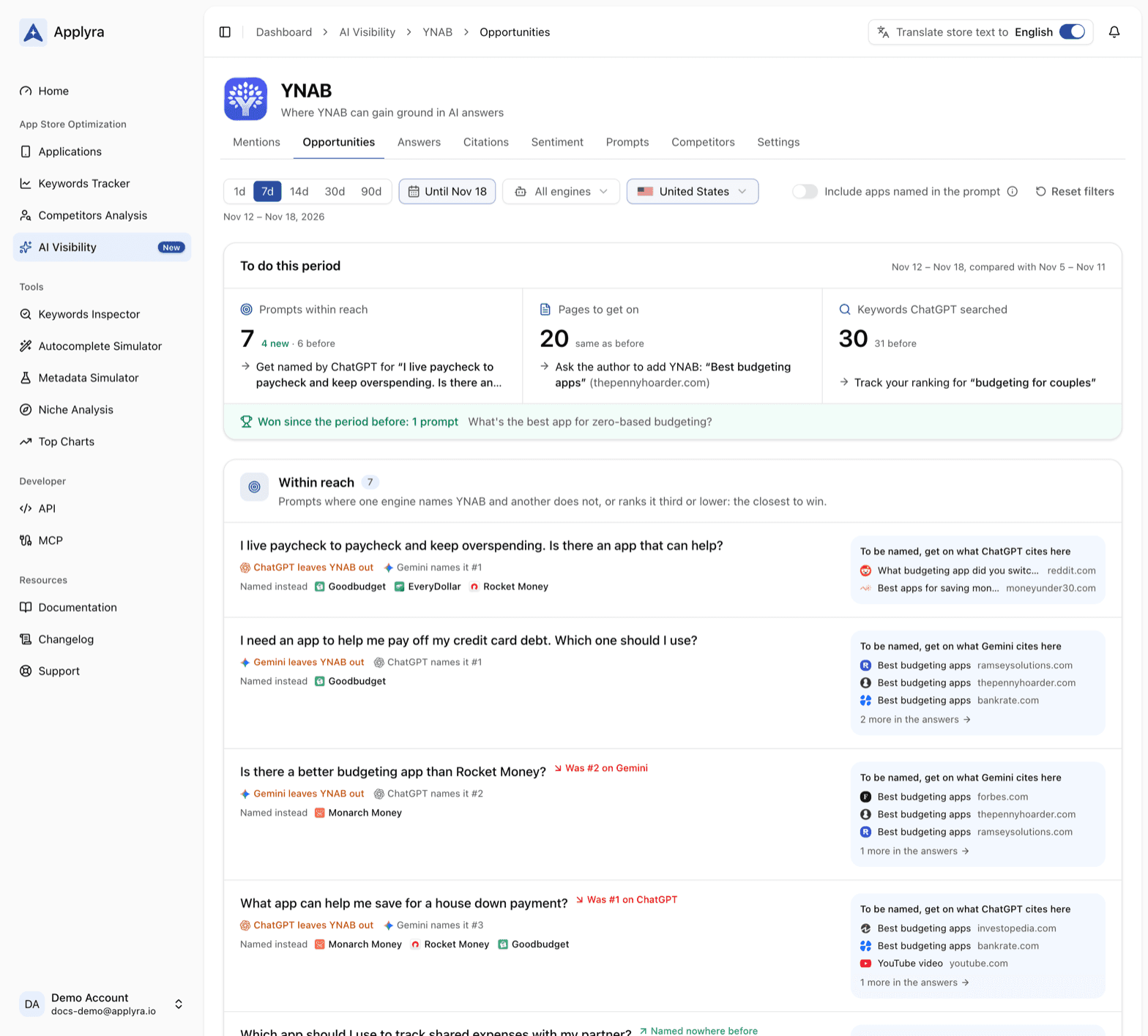
Within reach
A prompt is within reach when one engine names your app and the other does not, or when your app is named but low in the list. These are the closest wins you have: one engine already believes your app belongs in the answer.
Each row gives the prompt and what each engine does with it, such as ChatGPT leaves your app out, Gemini names it #1 or ChatGPT ranks your app #4, then the apps Named instead, or Named before it when you are named low. When the prompt moved since the period before, a badge says how: Was #2 on Gemini, Up from #4 on ChatGPT, Named nowhere before. On the right, To be named, get on what ChatGPT cites here lists the pages that engine cites for that prompt, and the rest are one click away in the answers.
Pick a single engine in the filters and the list keeps the prompts where that engine ranks your app low.
Pages to get on
These are the articles, reviews, threads and videos the engines cite in answers that leave your app out, the most cited first. Being on one is how an engine finds your app the next time. Each row shows who cites the page, how often, the apps it names instead of yours, and the move:
| Page | The move |
|---|---|
| Article | Ask the author to add your app |
| Download page | List your app on this site |
| Review site | Get your app listed and reviewed here |
| Thread | Reply in the thread, as your app's maker |
| Video | Pitch your app to the creator |
| Post | Pitch your app to the author |
Work them from the top. A page cited for several of your prompts, on both engines, is worth an afternoon. A thread reply works best when it answers the question asked and says plainly that you made the app. Forums are kind to makers who show up and answer, and hard on ads in disguise.
What ChatGPT searched for
When ChatGPT searches the web to answer your prompts, the queries it types, often called fan-out queries, describe what your app does the way people put it. What ChatGPT searched for lists them as keywords, each with how many times it was searched and the queries it came from.
Each keyword is ready to track in the stores. Edit it if you want, then press Track App Store ranking, or Track Google Play ranking when your app is only on Google Play in that market: it goes into the Keywords Tracker, with your app's daily ranking for it in that market. A keyword you already track reads Tracked on App Store: see its ranking, or Google Play, and links to it. If your app has no listing in that market in Applyra yet, the row offers to add it.
Before you track a keyword, inspect it like any other: a keyword ChatGPT searched is a strong idea, and its difficulty tells you whether your app can rank for it. The keywords show when the engine filter is on ChatGPT or on every engine.
A short playbook
- Open To do this period and take the first prompt within reach.
- Read its answers on the engine that leaves you out: what it says, who it names, which pages it leans on. The Answers tab has the full text.
- Get on one of those pages this week. One page done beats ten pages bookmarked.
- Track the keywords ChatGPT searched, from What ChatGPT searched for, so you also rank in the stores for the words your users type.
- Come back next week and look for the prompt in Won since the period before, or for its badge in Within reach.
Answers move as the pages they read change, so give each move a few weeks before you judge it. A weekly routine keeps the habit to fifteen minutes, and Citations shows every page cited, not only these.
Read the opportunities from your own tools
GET /ai-visibility/apps/{id}/opportunities in the API endpoints and
get_ai_opportunities in the MCP tools return the same three lists. In
ChatGPT or Claude, ask "which pages should my app get on this week?", then have the assistant
track the keywords ChatGPT searched with track_keywords.
Frequently asked questions
How do I get my app recommended by ChatGPT?
Get your app onto the pages ChatGPT and Gemini cite when they answer your users' questions, starting with the prompts where one engine already names you. Applyra's Opportunities tab lists those prompts and pages from your own answers, with the move to make on each, plus the words ChatGPT searched, ready to track in the stores.
Which AI prompts should I work on first?
The ones within reach: prompts where one engine already names your app and the other does not, or where your app is named but low in the list. They are the closest to win, and Applyra lists them with the apps named instead and the pages to get on.
How do I get my app onto a page that AI cites?
It depends on the page: ask the author of an article to add your app, list it on a download site, get it listed and reviewed on a review site, reply in a forum thread as the app's maker, or pitch it to the creator of a video or the author of a post. Applyra's Opportunities tab names the move for each page.
Why track the keywords ChatGPT searched for?
They are the words ChatGPT typed into its web search to answer your users: how people put what your app does. That makes them worth ranking for on the App Store and Google Play, and Applyra adds each one to the Keywords Tracker in one click.
How do I know my work on AI visibility is paying off?
In Applyra, Won since the period before lists the prompts that were within reach and now name your app near the top on every engine, and each prompt within reach shows how it moved, such as Up from #4 on Gemini or Named nowhere before.
Last updated on